

Running a car repair shop involves much more than diagnosing problems and repairing vehicles. Every day, workshop owners and service managers must handle customer enquiries, vehicle intake, repair estimates, parts, technician assignments, invoices, payments and follow-up communication.
When these activities are managed through paper forms, spreadsheets, phone calls and disconnected applications, important information can become difficult to track. A customer may be waiting for an estimate, a technician may need approval to continue a repair, or a completed vehicle may still have an outstanding invoice.
The solution is to establish a consistent workflow that connects every stage of the repair process.
In this guide, we’ll explore how to manage a car repair shop more efficiently, from the moment a customer requests a service to the final invoice and the next maintenance visit. We’ll also look at how car repair shop management software can help garages organize their work, improve customer communication and gain better visibility into daily operations.
RepairBuddy is a great Auto Repair Shop Software which can make your your business process easy and professional to manage.
1. Establish a Clear Vehicle Booking and Intake Process
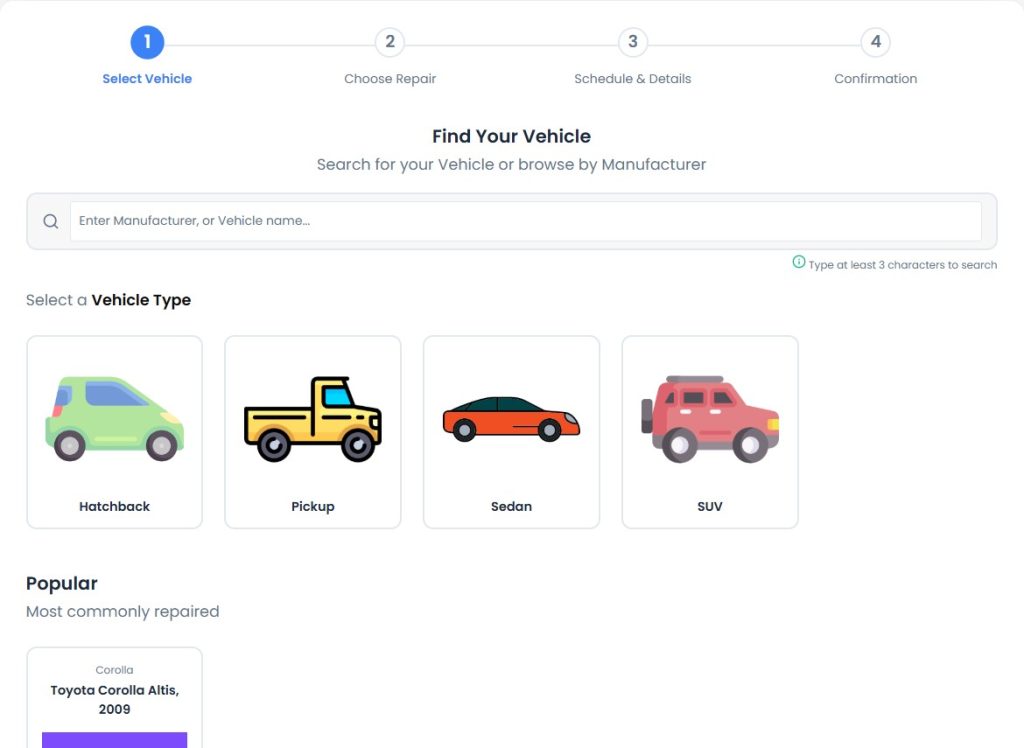
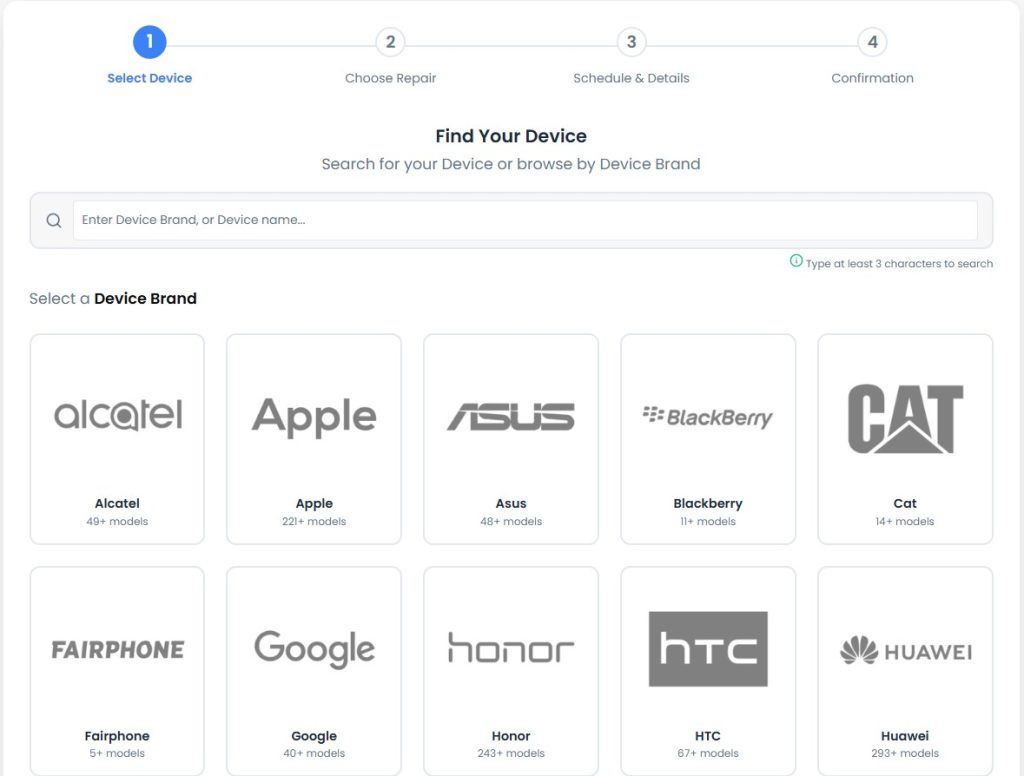

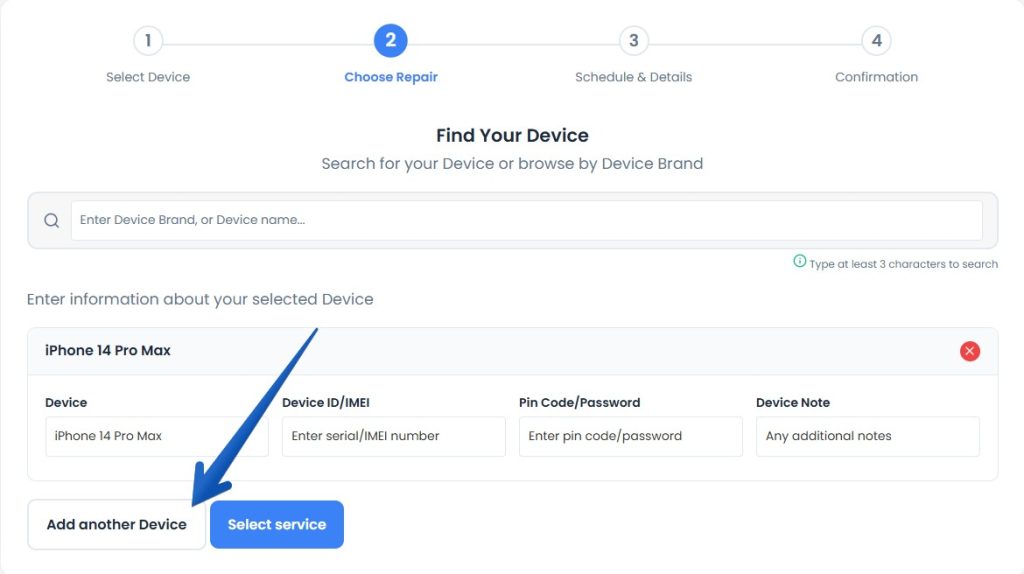
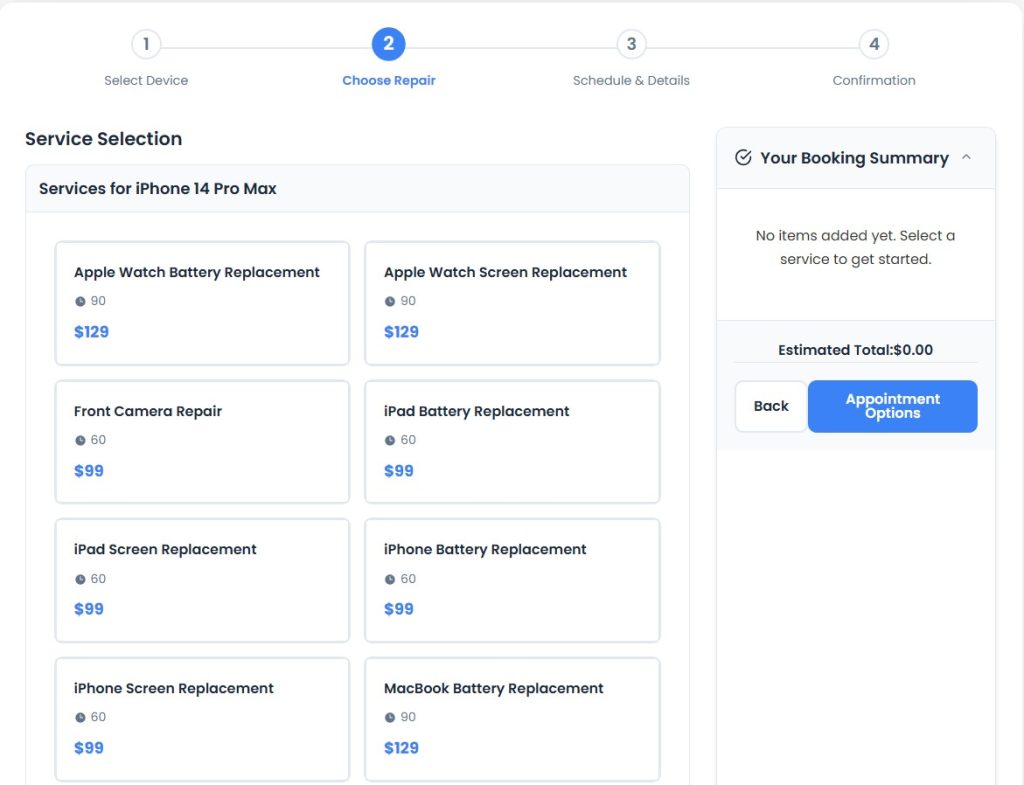
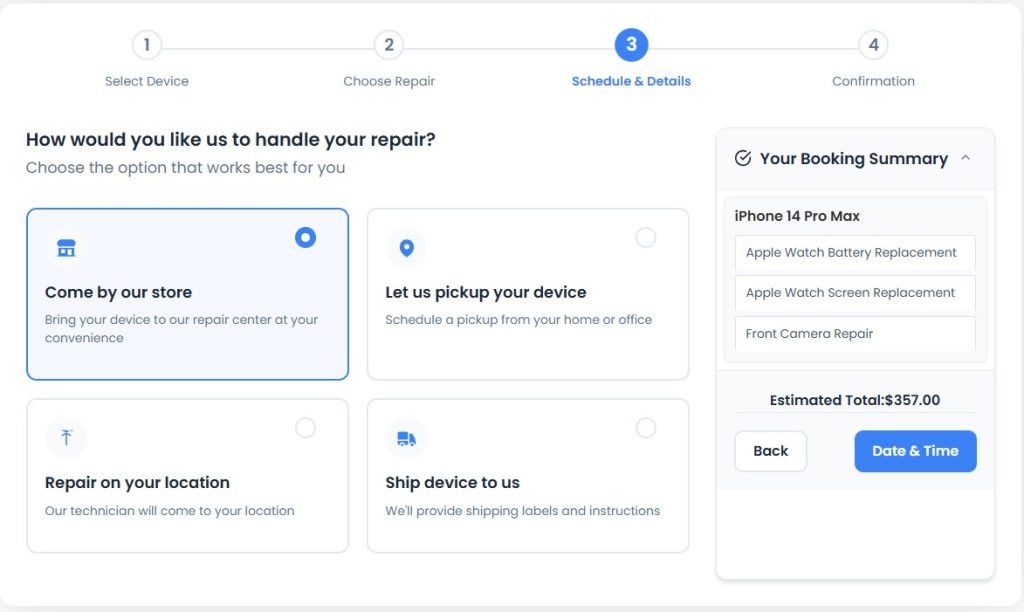
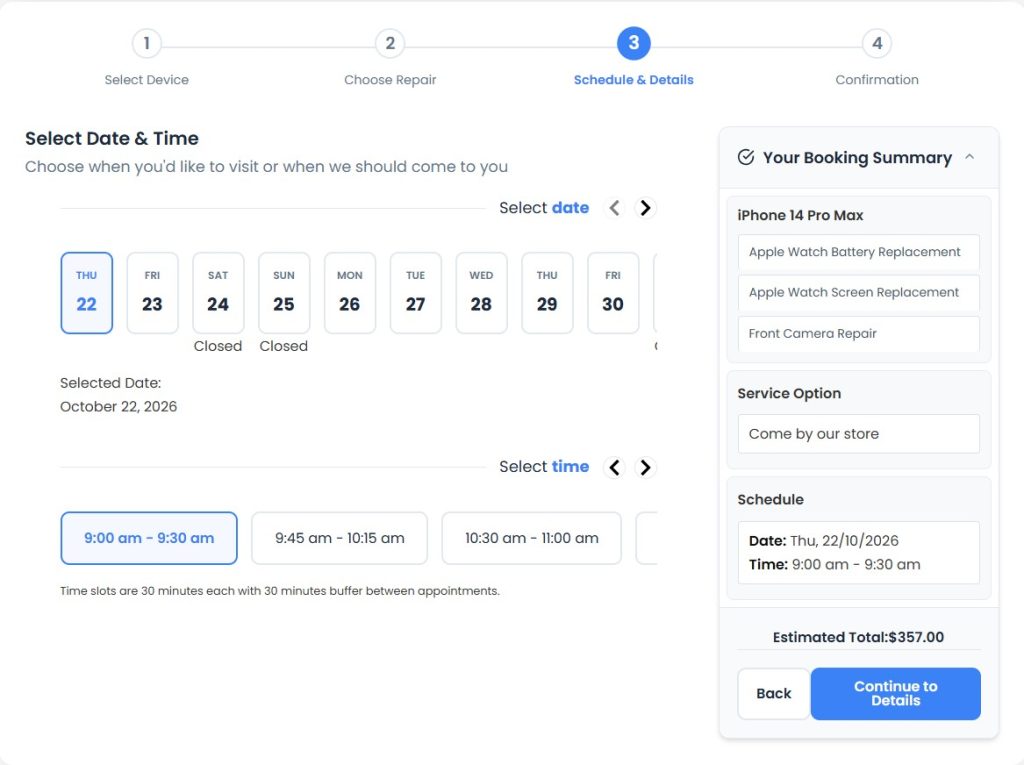
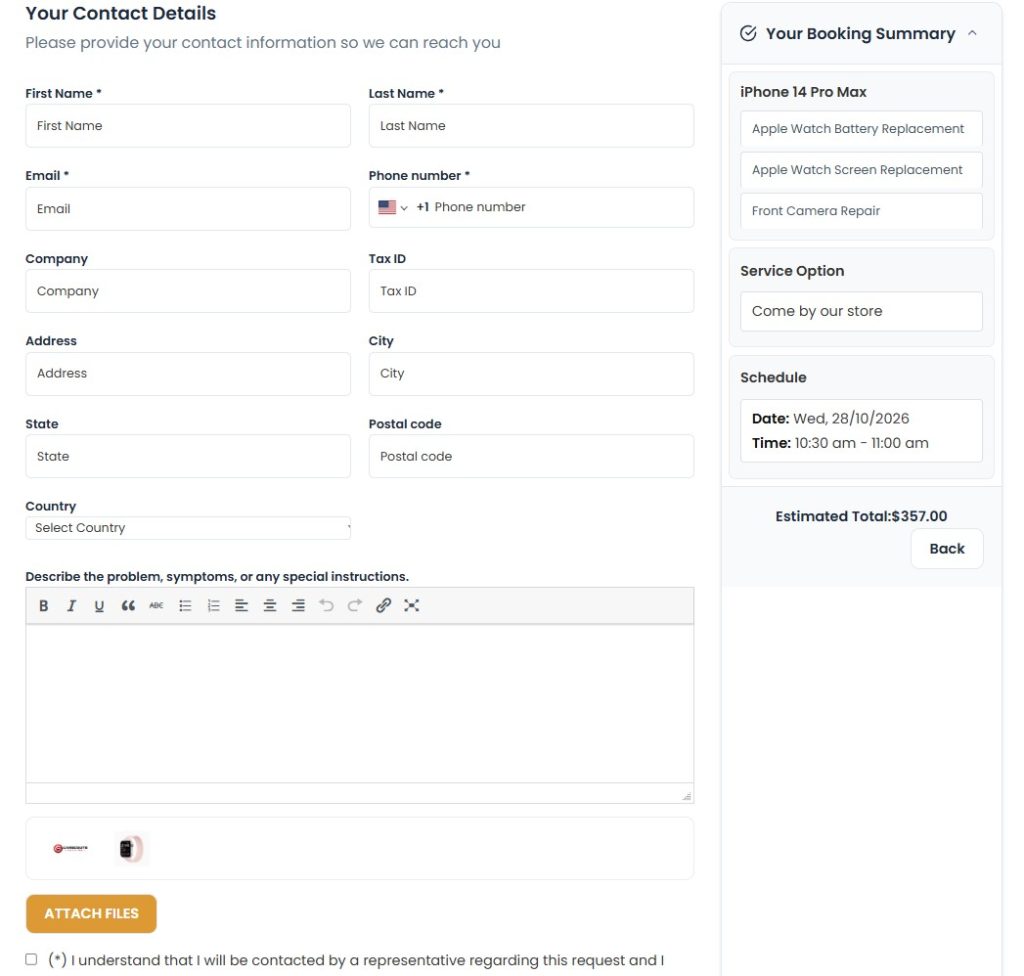
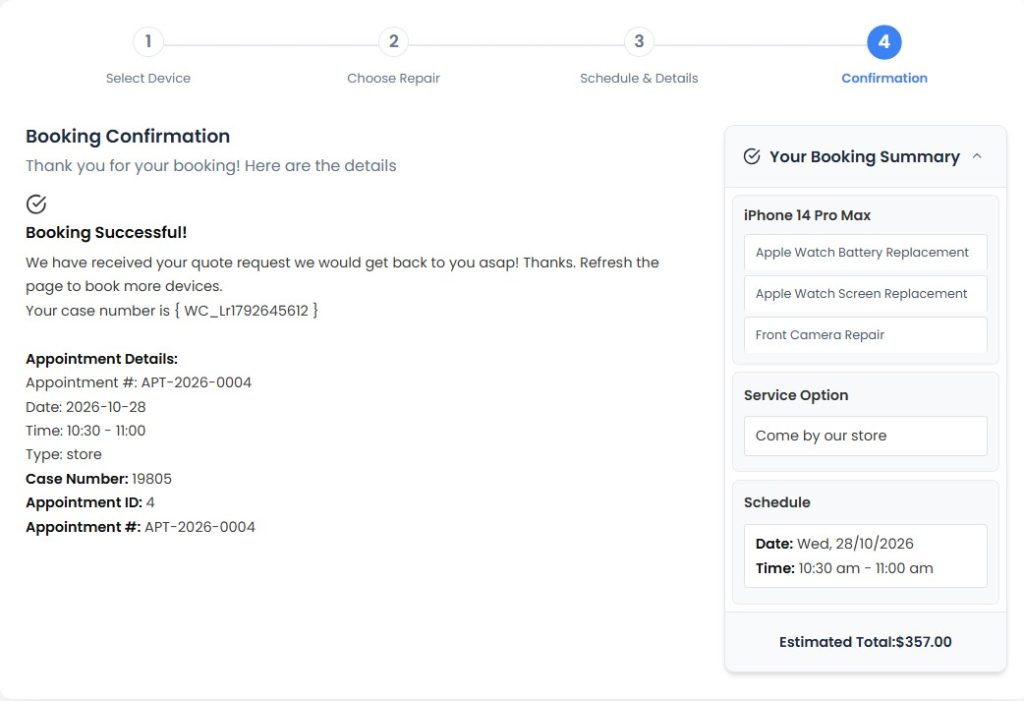
Every successful repair begins with collecting the right information.
When a customer contacts your garage, you need to understand which vehicle requires attention, what problem the customer has noticed and how the vehicle can be inspected or serviced. Missing information at this stage can create unnecessary follow-up calls and confusion later.
A consistent vehicle intake process should capture:
- Customer name and contact information.
- Vehicle type, make and model.
- Vehicle identification number (VIN), registration number and mileage, where relevant.
- A description of the reported problem.
- Supporting photographs or documents, when needed.
- Preferred appointment date and time.
- Any additional information required by your workshop.
Make it easier for customers to book online
An online vehicle booking form allows customers to submit repair requests through your website without relying entirely on phone calls or messages.
With RepairBuddy, a garage can configure its booking forms to collect vehicle details, including vehicle type, manufacturer, model, identification information and the reported issue. Customers can also upload supporting files and book multiple vehicles in one session where the workflow requires it.
For example, a customer who needs brake inspection and air-conditioning service can submit the relevant information before arriving at the workshop. Your team can then review the request and prepare for the appointment.
Online booking does not replace the need for a proper inspection. Instead, it helps your team collect useful information before work begins.
Practical tip: Review your booking form periodically. Collect the details your team genuinely needs, but avoid making the form unnecessarily long. The goal is to make it easy for customers to request a service while giving your staff enough information to prepare.
Explore car repair booking and management with RepairBuddy.
Suggested screenshot: Use the vehicle booking screenshot from the Car Repair Shop Software landing page, preferably the one showing vehicle selection and the booking details form.
2. Inspect the Vehicle and Document the Reported Problem
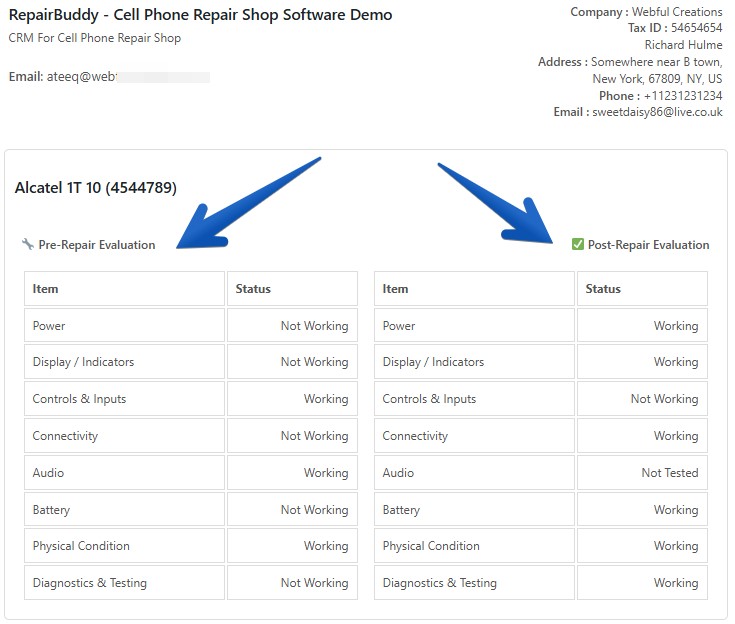
A customer’s description is an important starting point, but it should not be confused with a confirmed diagnosis.
A driver might report unusual engine noise, reduced braking performance, a warning light or difficulty starting the vehicle. Your technician needs to inspect the vehicle and document the findings before the workshop can determine the required work.
Create a consistent inspection process that records:
- The customer’s original complaint.
- Inspection observations and diagnostic findings.
- Visible damage or other relevant conditions.
- Recommended repairs and services.
- Parts that may be required.
- Additional checks that need to be completed.
Where appropriate, record the vehicle’s condition at intake and keep relevant photographs with the job documentation.
This information helps your team explain the recommended work and gives the customer a clearer understanding of what needs attention.
It can also be useful when a customer returns with a question about previous work. Instead of relying on someone’s memory, your staff can refer to the documented repair history.
Practical tip: Separate the reported symptom from the technician’s findings and recommended solution. This makes estimates easier to understand and helps prevent misunderstandings about the work the customer has authorized.
3. Prepare Detailed Repair Estimates Before Starting Work
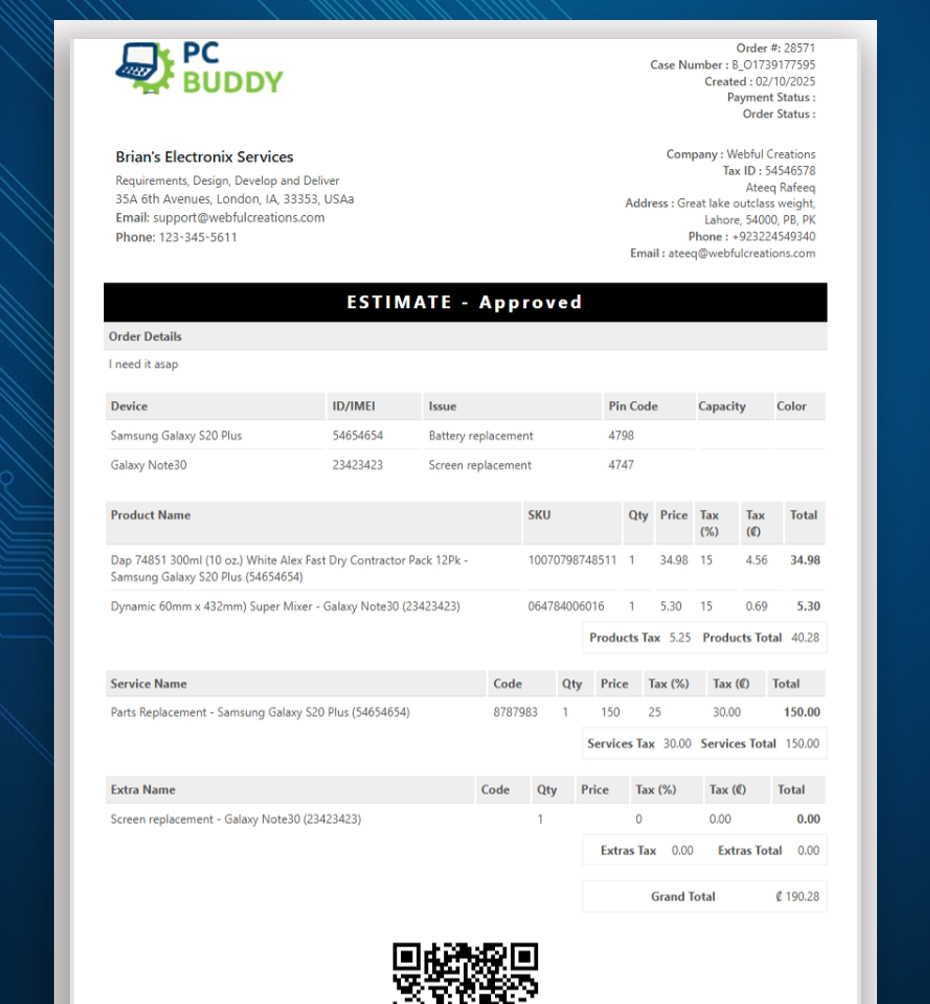
One of the most important responsibilities of a repair shop is communicating the expected cost of a job.
An estimate should explain what the workshop proposes to do and what the customer is being asked to approve. A vague total can leave customers uncertain about labor charges, replacement parts and additional services.
A useful car repair estimate can include:
- Labor services and associated charges.
- Required parts and their prices.
- Additional services or items.
- Applicable taxes, discounts and other charges.
- Relevant terms and conditions.
- The total estimated amount.
For example, a brake repair estimate might list the inspection, replacement parts and labor separately. If the technician later discovers another issue, the workshop can document the additional work and obtain the customer’s approval according to its procedures.
Make estimate approval part of your workflow
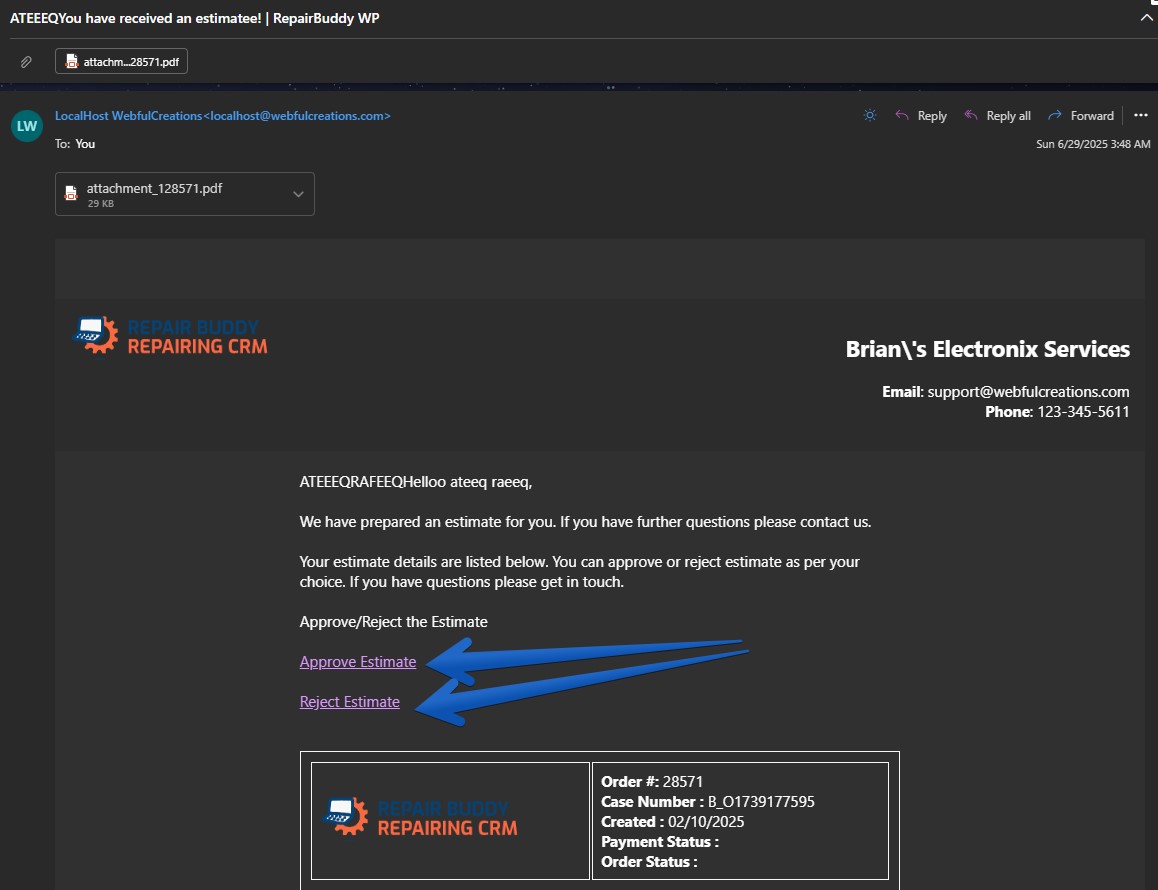
Sending estimates digitally can reduce the need to print documents or repeatedly contact customers to ask whether they have made a decision.
RepairBuddy allows repair businesses to create estimates containing services, parts and additional items, then send them to customers for approval or rejection through email. Approved estimates can be converted into active repair jobs, helping connect the quotation process to the work that follows.
This creates a clearer record of what was proposed and whether the customer approved it.
Remember that an estimate is not necessarily a final invoice. If the scope of work changes, communicate the difference and obtain any additional authorization required before proceeding.
Practical tip: Make it easy for customers to understand what is included, what is optional and what might require further inspection. Clear estimates support better customer relationships and more informed decisions.
Suggested screenshot: Reuse the estimate screenshot from your landing page that shows services, parts, extras and the customer approval workflow.
4. Convert Approved Estimates into Organized Repair Jobs
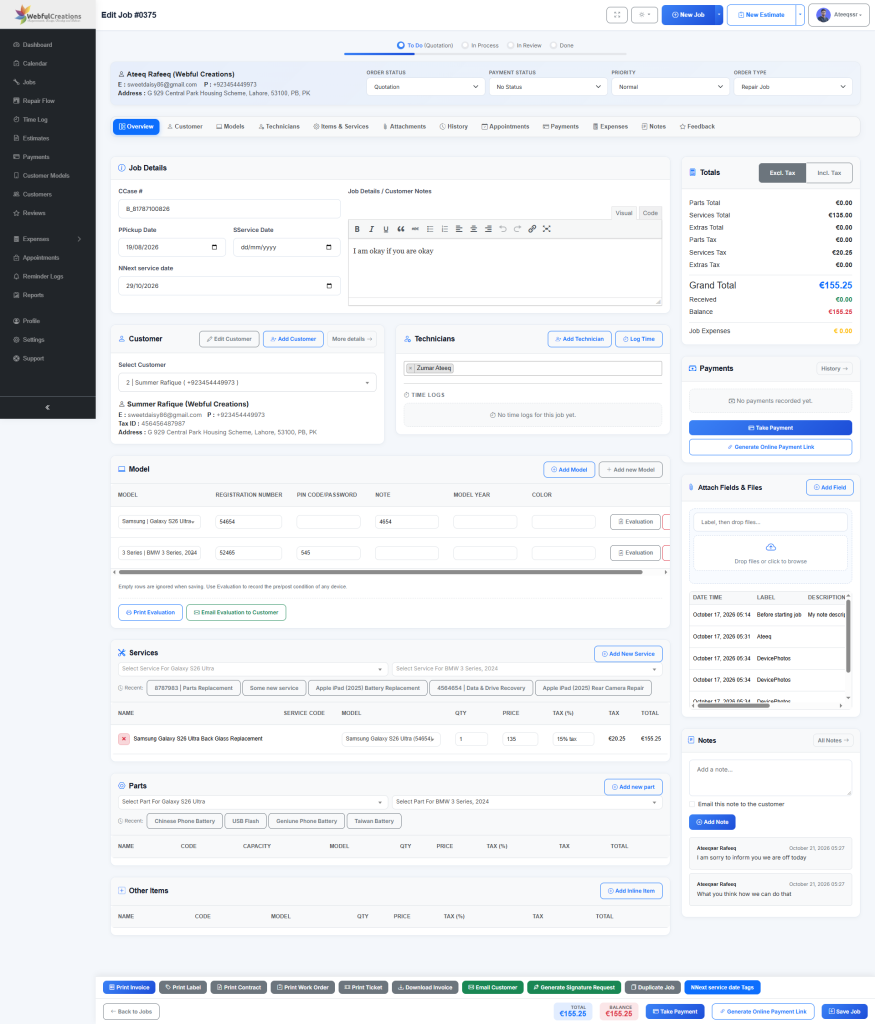
Once the customer approves the proposed work, the workshop needs a reliable way to manage the repair.
A repair job should contain the information your team needs to complete the work, communicate progress and prepare the vehicle for delivery.
Depending on the job, this may include:
- Customer and vehicle details.
- Approved services and parts.
- Inspection findings and work instructions.
- Assigned technician or responsible team member.
- Job status and relevant dates.
- Notes, attachments and work logs.
- Payment and delivery information.
Without a consistent process, important details can remain scattered across messages, handwritten notes and individual employees’ memories.
Use a consistent repair workflow
Define the stages a typical repair passes through. For example, a workshop might use stages such as:
- Booking received.
- Vehicle checked in.
- Inspection and estimate preparation.
- Awaiting customer approval.
- Repair in progress.
- Quality checks and completion.
- Ready for collection.
- Delivered and invoiced.
Your exact stages should reflect how your workshop operates. A small independent garage may need a simpler workflow than a larger workshop with multiple technicians and different service categories.
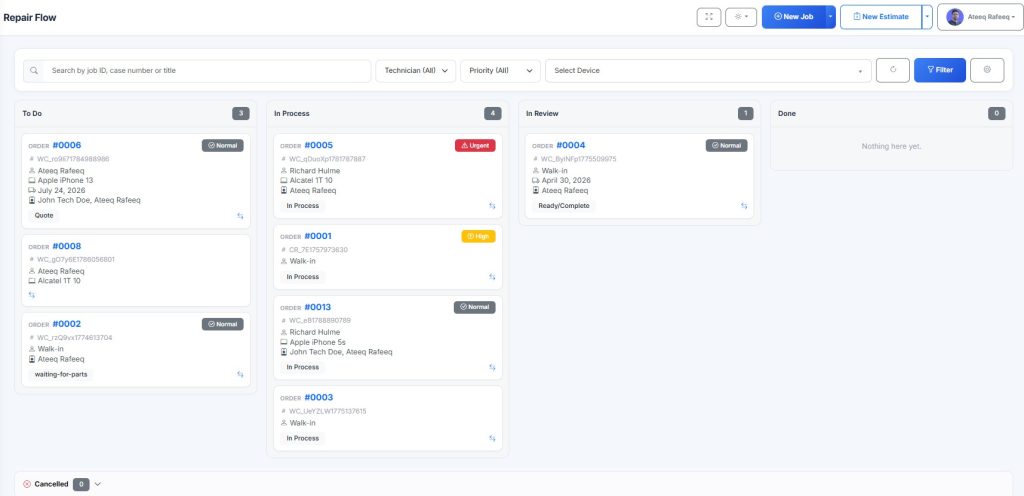
RepairBuddy provides repair job management, configurable job statuses, technician assignments, job notes and work logs to help shops organize the work. Its workflow can connect approved estimates with active jobs so staff can manage the repair beyond the initial booking.
Practical tip: Give every job a clear current status and make sure staff know who is responsible for the next action. A status should help someone understand what needs to happen next, not simply describe what happened previously.
Suggested screenshot: Use the RepairBuddy job management or repair flow board screenshot from your existing landing page.
5. Assign Technicians and Keep Work Orders Organized
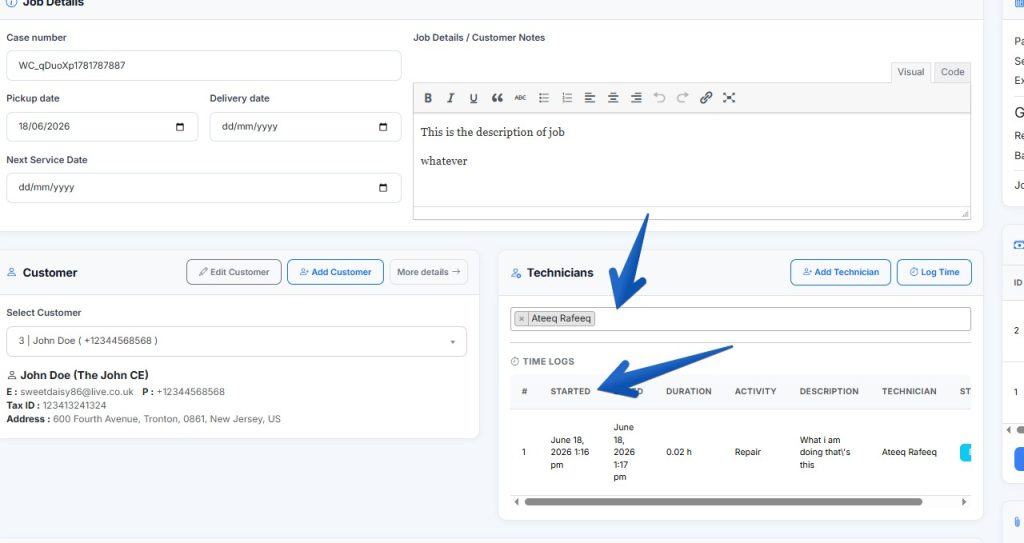
When a workshop has multiple employees or several vehicles awaiting repair, assigning responsibility becomes essential.
Without clear assignments, staff may duplicate work, overlook a task or spend time asking who is handling a particular vehicle.
A structured work order helps translate an approved repair into actionable work for the team.
A work order may contain:
- The vehicle and customer details.
- Authorized services and parts.
- Technician instructions.
- Inspection notes and supporting documents.
- Relevant deadlines or target completion dates.
- Work logs and status updates.
- Customer authorization records, where applicable.
Give technicians the information they need
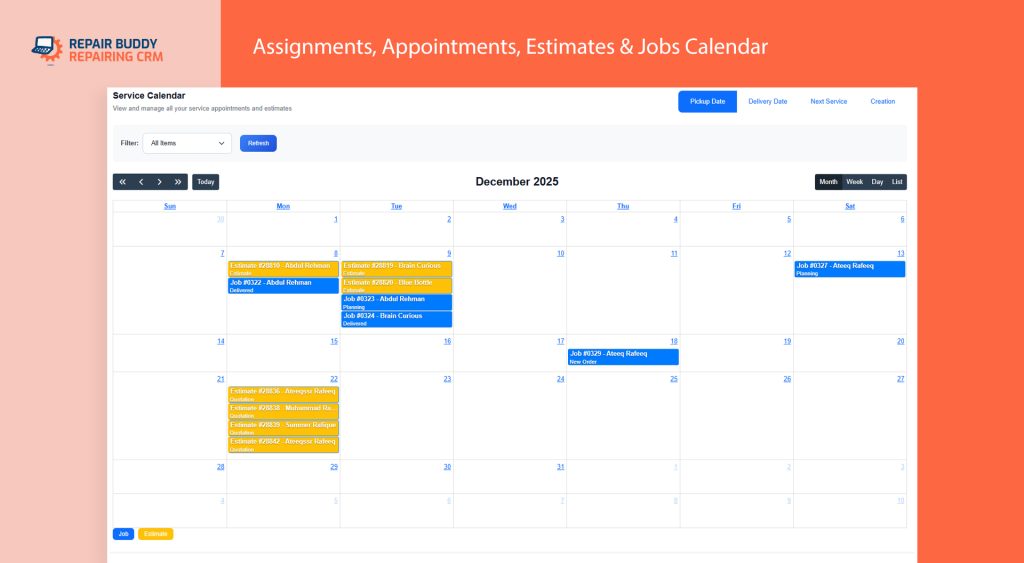
Before a technician begins, they should be able to understand the requested work, review the relevant findings and identify any important restrictions or customer instructions.
As work progresses, the team can record notes and update the job status. This helps managers understand which jobs are progressing and which may need attention.
RepairBuddy supports technician assignments, work orders, job logs and digital signatures for repair documentation. Shops can use these capabilities to keep job information more organized and retain a record of the relevant workflow.
A digital signature or signed work order can support documentation of authorization, but it should not be treated as a substitute for appropriate legal terms, customer consent or compliance with local requirements.
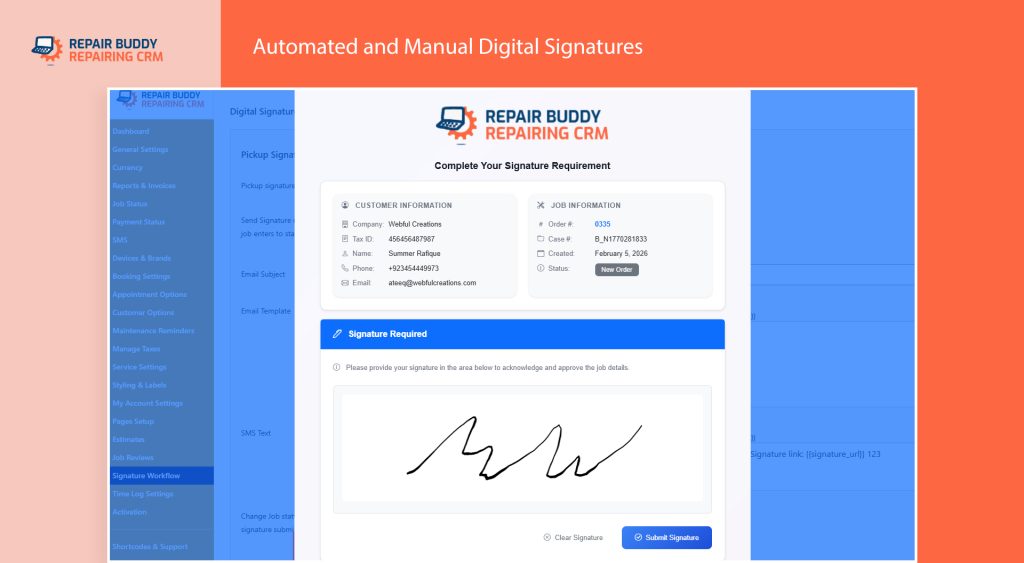
Practical tip: Establish a standard for documenting work. Encourage technicians to record meaningful findings and actions instead of relying on informal verbal updates.
6. Keep Customers Informed Throughout the Repair
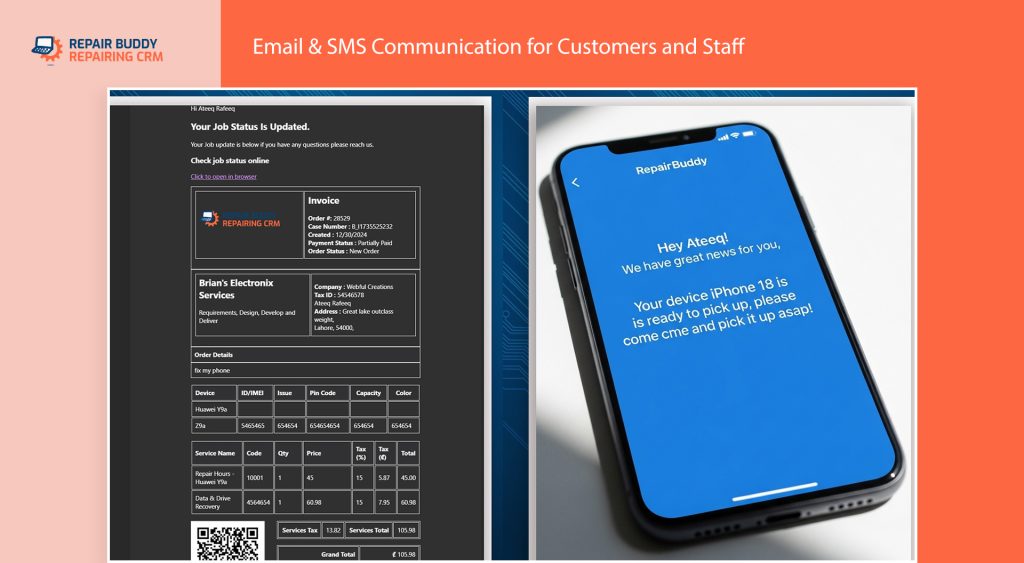
Customers often want to know three things: what is happening to their vehicle, how much the work will cost and when they can expect an update.
If customers cannot easily obtain this information, they may repeatedly call the workshop. These calls interrupt staff and make it harder to focus on active jobs.
A better approach is to build communication into the repair workflow.
Use notifications and online job tracking
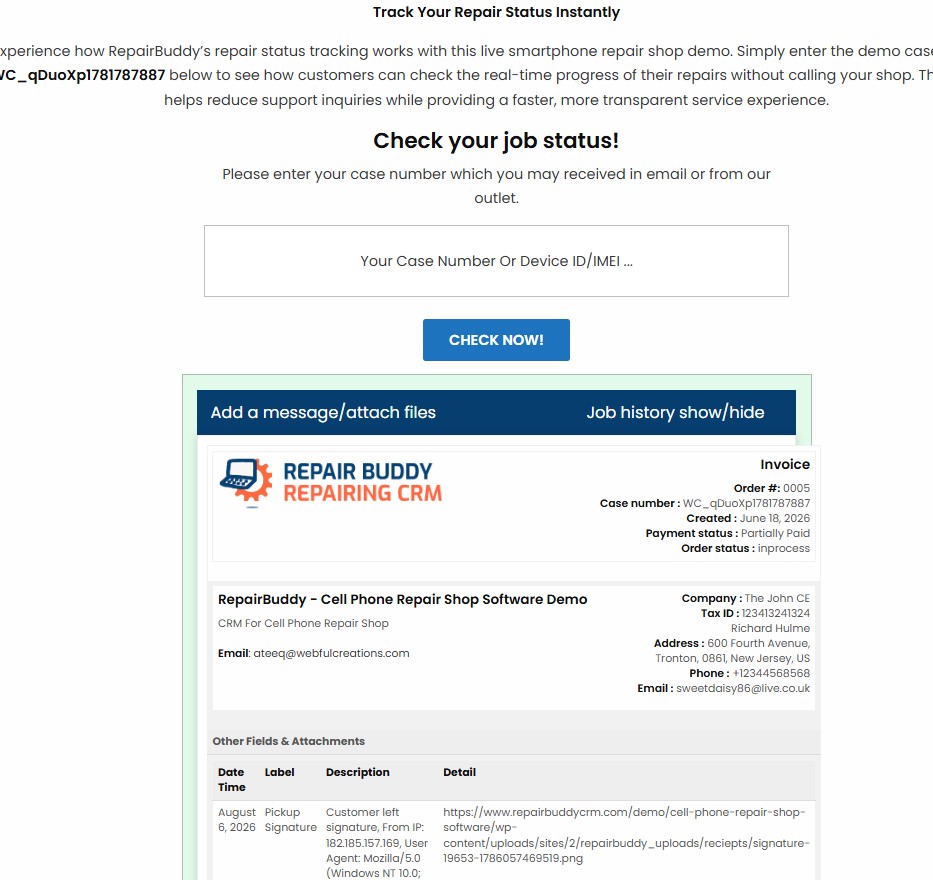
Depending on the workflow and settings, useful customer communications include:
- Booking confirmations.
- Estimate notifications and approval requests.
- Repair status updates.
- Invoice and payment communications.
- Completion and collection notifications.
RepairBuddy supports configurable email templates and SMS notifications through supported integrations. Customers can also use the online job status checker to check repair progress using the available job identification information, such as a case ID or VIN.
This gives customers another way to check their repair status without needing to contact the workshop for every update.
The customer portal provides another layer of self-service. Depending on the configured features, customers can view job information, review service history, access invoices, leave feedback and book appointments.
Communicate when something changes
Automated communication is most useful when it reflects a meaningful event. For example, a notification may be appropriate when a job enters a new status or when an estimate requires customer attention.
Avoid promising a delivery time that has not been confirmed. If additional work or parts affect the schedule, update the customer rather than allowing an outdated expectation to remain in place.
Practical tip: Decide which job events should trigger a message, who is responsible for handling replies and how staff should communicate delays. Consistency matters more than sending a large number of notifications.
Suggested screenshots: Use the online job status checker, customer portal and automated repair status notification screenshots from the existing Car Repair Shop Software page.
7. Manage Parts, Services and Additional Work Carefully
Parts and labor directly affect both the customer estimate and the workshop’s final invoice. If the items used during a repair are not recorded accurately, it becomes harder to explain charges and review job costs.
A useful process connects the approved estimate to the work actually completed.
For each repair, staff should be able to identify the relevant services, record the parts used and document any additional authorized work.
RepairBuddy supports adding services, parts and extras to estimates and repair workflows. Its parts management capabilities can help shops organize repair items, while WooCommerce integration provides an additional option for businesses using WooCommerce products in their workflows.
The exact inventory process depends on how the shop has configured its services and parts.
For example, a garage may maintain a catalog of commonly used filters, brake components and other repair parts. When preparing an estimate, staff can select the relevant items rather than repeatedly entering the same descriptions and prices.
Establish a process for additional repairs
Suppose a technician discovers another issue during an inspection. The workshop should document the finding, explain the proposed work and communicate any price or timing changes to the customer.
Do not assume that approval for one repair automatically authorizes unrelated additional work.
Practical tip: Review completed jobs periodically to identify missing parts, unclear labor entries or differences between approved estimates and final invoices. This helps improve consistency in both service delivery and billing.
8. Create Accurate Invoices and Track Payments
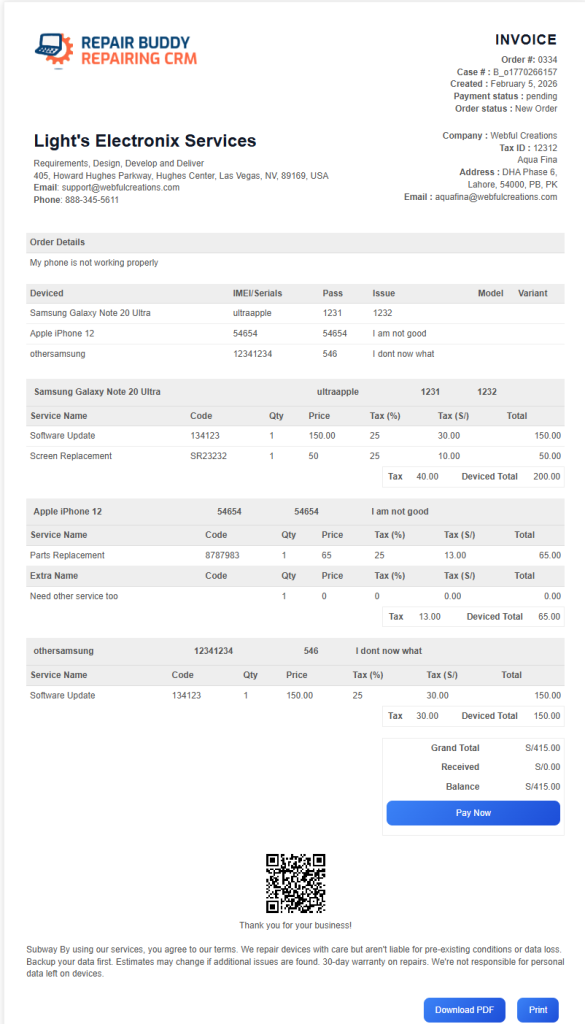
The final invoice should clearly explain the work performed and the amount due.
An organized billing process also helps the shop identify outstanding balances and maintain useful financial records.
A professional repair invoice may include:
- Customer and vehicle information.
- Completed services and parts.
- Labor and other charges.
- Applicable taxes and discounts.
- Payment status and amount outstanding.
- Warranty information and relevant terms, where applicable.
RepairBuddy can generate invoices, maintain payment records and support payment collection through configured options. Its supported workflows include online payment integrations and manual payment methods such as cash or bank payments, depending on the shop’s setup.
Shops can also manage partial or staged payments where their configuration supports them.
Separate invoice creation from payment reconciliation
Generating an invoice does not necessarily mean it has been paid. Staff should record payments correctly and review outstanding balances so they can identify invoices that need follow-up.
Before handing a vehicle back to the customer, follow your workshop’s procedures for final checks, documentation, payment and collection.
Practical tip: Reconcile recorded payments against the actual amounts received. Clear payment records help reduce billing confusion and give owners a more reliable view of outstanding revenue.
Suggested screenshot: Use the invoice generation or payment management screenshot from your RepairBuddy landing page.
9. Use Reports to Understand Workshop Performance
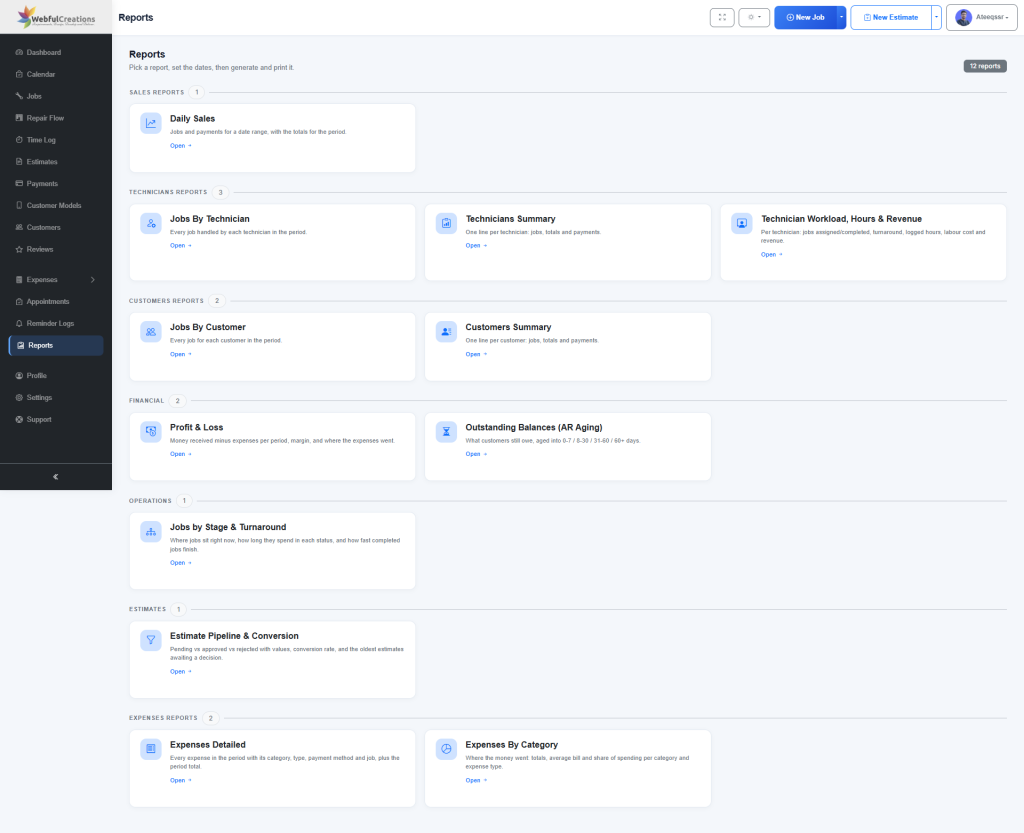
A busy garage can still struggle to understand its overall performance if its information is scattered across separate records.
Reports help turn day-to-day activity into information that owners and managers can use when making decisions.
Useful areas to review include:
- Jobs received and completed.
- Sales over selected periods.
- Estimates and their approval outcomes.
- Payments received and outstanding balances.
- Work associated with technicians or service categories.
- Customer activity and repeat business.
RepairBuddy provides reports for shop owners, including sales and service information, job breakdowns and payment-related insights. The available reports can help owners examine activity across the workshop rather than relying solely on a general impression of how busy the shop feels.
Review the numbers regularly
A simple weekly review can help answer practical questions:
- Are completed jobs keeping pace with incoming work?
- Are estimates waiting too long for a customer decision?
- Are outstanding invoices increasing?
- Which services are generating the most activity?
- Are certain jobs repeatedly delayed?
- Are customers returning for follow-up services?
Use these observations to identify areas that deserve investigation. For example, an increase in outstanding estimates might indicate that staff need a clearer follow-up process. A growing backlog might suggest that the workshop should review scheduling or technician capacity.
Be careful when interpreting profitability. Revenue alone does not show how profitable a service is; parts costs, labor, overhead and other expenses also matter.
Practical tip: Choose a small set of meaningful metrics and review them consistently. A regular review of reliable information is more useful than collecting numbers that nobody acts upon.
10. Turn Completed Repairs into Future Service Opportunities
A customer collecting a repaired vehicle does not necessarily mark the end of the relationship.
Depending on the service performed, the customer may need a follow-up inspection, routine maintenance or another service in the future. Keeping an organized service history can help your team communicate relevant reminders instead of relying on memory.
You may also paste a repair tag or next service reminder on customer’s car somewhere so they can see when their next service is due.
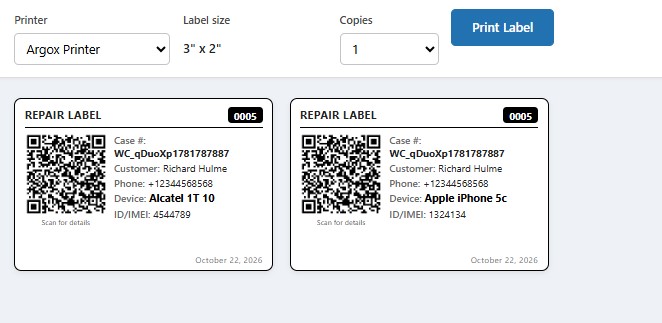
A useful follow-up process includes:
- Recording the completed work.
- Keeping the customer’s contact details accurate.
- Maintaining a history of previous services.
- Recording the next recommended service date when appropriate.
- Sending relevant reminders through the configured communication channels.
- Inviting feedback after the repair.
Use maintenance reminders thoughtfully
RepairBuddy supports maintenance reminders that can be scheduled for future service dates, with email or SMS communication depending on the configuration.
For example, a shop might remind a customer about a previously recommended inspection or an upcoming service interval. The reminder should be relevant to the vehicle and the work performed, rather than a generic message sent without context.
The workshop should also be clear about whether a reminder represents a recommendation or a confirmed appointment. A reminder does not mean that the customer has booked a visit.
Ask for feedback and encourage repeat visits
Customer feedback can help identify service problems and highlight areas where the workshop is performing well. A timely request after a completed job gives customers an opportunity to share their experience.
RepairBuddy includes feedback and review-related functionality alongside customer records and service history, helping shops incorporate follow-up into their wider customer management process.
Practical tip: Treat reminders and review requests as part of customer service, not just marketing. Send relevant messages, respect communication preferences and make it easy for customers to contact the workshop.
11. Choose Car Repair Shop Software That Fits Your Workflow
As a garage grows, managing bookings, estimates, job records, customer communication and invoices manually can become increasingly difficult.
Car repair shop software can bring these activities into a more connected workflow. However, the right solution should match the way your business actually operates.
Before choosing software, consider the following questions:
Can customers submit repair requests online?
Look for configurable booking forms that collect the information your team needs before an appointment.
Can you prepare estimates and obtain customer approval?
The system should support clear quotations and a process for recording the customer’s decision.
Can you track active jobs and technician assignments?
Staff should be able to see job status, relevant instructions and who is responsible for the next action.
Can customers check repair progress?
Online tracking and customer self-service can make repair information easier to access.
Can you manage invoices and payment records?
Check whether the system supports your billing process, taxes, payment methods and documentation requirements.
Can you follow up with customers?
Customer history, service reminders and feedback tools can help your workshop maintain relationships after the repair is complete.
Can you review shop performance?
Reports should help you understand activity, outstanding payments and other useful aspects of your operation.
How RepairBuddy supports car repair businesses
RepairBuddy is a repair shop management solution that can be adapted for automotive repair workflows through configurable vehicle information, booking forms, services and related settings.
Its feature set includes online vehicle booking, repair estimates and approvals, job management, technician assignments, work orders, digital signatures, customer status tracking, notifications, invoicing, payment records, reports, customer portal functionality and maintenance reminders.
Because RepairBuddy is built for WordPress, businesses can use its self-hosted plugin approach, while RepairBuddy Cloud offers a hosted alternative. The best option depends on how you want to operate and manage your website and software.
Explore the Car Repair Shop Software landing page to review the relevant features and see how RepairBuddy can fit into your workshop workflow.
12. A Practical Daily and Weekly Checklist for Garage Owners
Even with good software, consistent processes remain important. Use a simple checklist to help your team stay organized.
Daily checklist
- Review new bookings and upcoming appointments.
- Confirm that incoming vehicle details are complete.
- Check estimates waiting for customer approval.
- Review active jobs and technician assignments.
- Follow up on repairs that need attention.
- Send relevant customer updates.
- Check completed jobs, invoices and outstanding payments.
- Confirm that vehicle collection and handover steps are complete.
Weekly checklist
- Review completed jobs and incoming workload.
- Identify estimates that have remained unanswered.
- Review outstanding invoices and payment records.
- Examine recurring delays and workflow bottlenecks.
- Check whether parts and service records are complete.
- Review customer feedback and unresolved complaints.
- Identify upcoming maintenance reminders.
- Look at reports to understand changes in shop activity.
Adapt this checklist to your team size, services and business requirements. The objective is not to create more paperwork, but to make important tasks visible and repeatable.
Conclusion: Build a More Organized Car Repair Business
Managing a car repair shop effectively requires a clear process for every stage of the customer journey. From booking and vehicle intake to estimates, technician assignments, repair tracking, invoicing and follow-up, each stage depends on accurate information and clear communication.
Start by documenting your existing workflow. Identify where information gets lost, where customers wait for updates and which tasks require repeated manual effort. Then introduce consistent procedures and tools that address those specific problems.
Car repair shop management software can help connect these activities, reduce fragmented records and give your team better visibility into its work. The result depends on how well the software fits your workflow and how consistently your team uses it.
RepairBuddy brings booking, estimates, job management, customer communication, invoicing, reporting and maintenance reminders into a repair management solution designed to work with WordPress.
If you’re looking to organize your garage’s workflow, explore the RepairBuddy Car Repair Shop Software page and review the available features for your business.
Ready to see how the workflow works?
Explore the Live Auto Repair Demo