
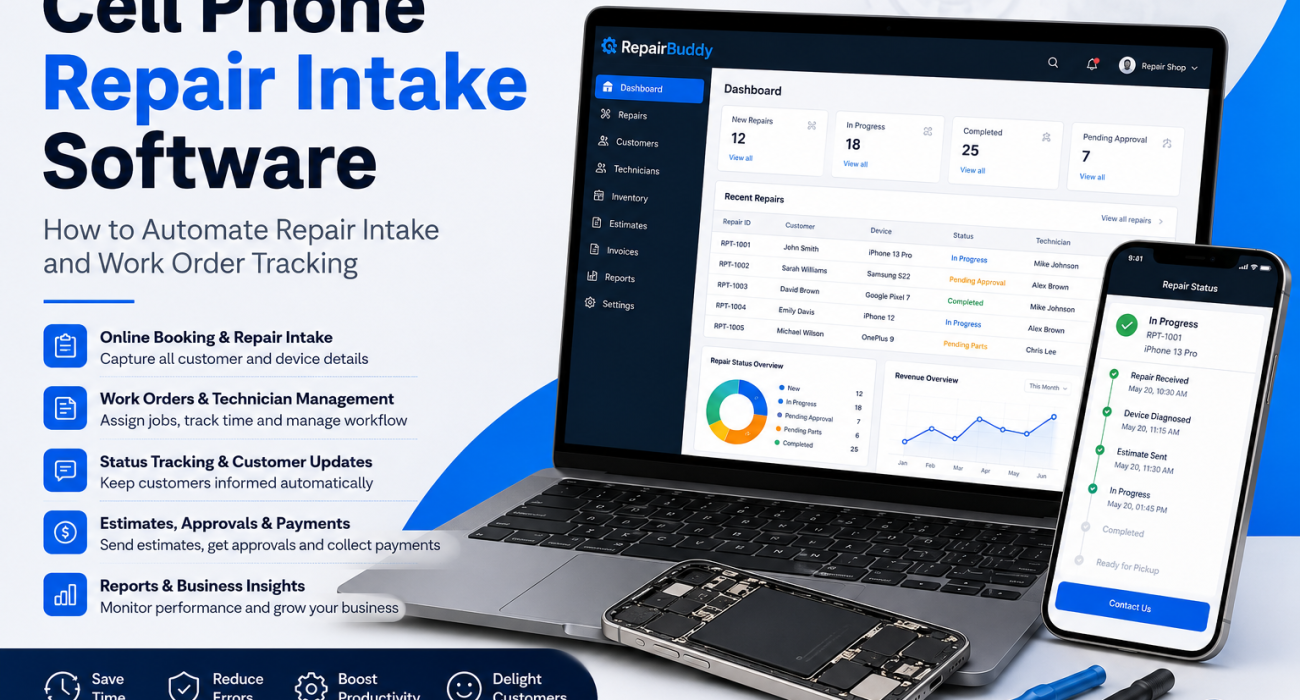
Every successful repair begins with an efficient intake process. Whether you’re repairing iPhones, Samsung Galaxy devices, Google Pixel phones, or other smartphones, the way you receive a customer’s device has a direct impact on the speed, accuracy, and profitability of the entire repair.
Unfortunately, many repair shops still rely on handwritten repair tickets, spreadsheets, or disconnected software to manage customer check-ins and technician work orders. These outdated processes often lead to missing device information, misplaced repair tickets, communication delays, inventory mistakes, and frustrated customers who repeatedly call asking for repair updates.
This is where cell phone repair intake software makes a significant difference. Instead of manually collecting customer information and creating repair tickets, modern repair shop software automates the entire workflow—from the moment a customer books a repair until the repaired device is picked up.
In this guide, we’ll walk through the complete smartphone repair intake process used by modern repair businesses. You’ll learn how to automate repair bookings, capture important device information, generate professional work orders, assign technicians, send repair estimates for approval, track repair progress, collect payments, and deliver a better customer experience with far less manual work.
Whether you operate a small independent repair shop or manage multiple repair locations, implementing an automated repair intake workflow can help your business stay organized, reduce administrative tasks, improve technician efficiency, and provide the professional experience today’s customers expect.
Why Repair Intake Is One of the Most Important Parts of Your Repair Business
Many repair shop owners focus on repairing devices quickly, but the repair process actually begins long before a technician opens the phone. The customer intake process establishes everything that follows—including repair estimates, technician assignments, inventory allocation, customer communication, invoicing, and final delivery.
If important information isn’t collected during check-in, problems quickly appear later in the workflow. Missing IMEI numbers, forgotten passcodes, undocumented physical damage, unclear customer requests, or incomplete contact information can all create unnecessary delays and disputes.
A professional repair intake process ensures that every repair starts with complete and accurate information. Instead of relying on paper forms or memory, modern repair shops use cell phone repair intake software to automatically capture customer details, device information, repair symptoms, photos, accessories, warranty details, and customer authorization—all in one centralized repair ticket.
By standardizing the intake process, repair shops can reduce mistakes, improve technician productivity, and provide customers with a more transparent repair experience from drop-off to pickup.
Benefits of an Automated Repair Intake Process
- Reduce paperwork and manual data entry
- Create professional digital repair tickets instantly
- Capture IMEI numbers, serial numbers, passcodes, and accessories accurately
- Document existing device damage with photos
- Generate repair estimates faster
- Assign technicians automatically
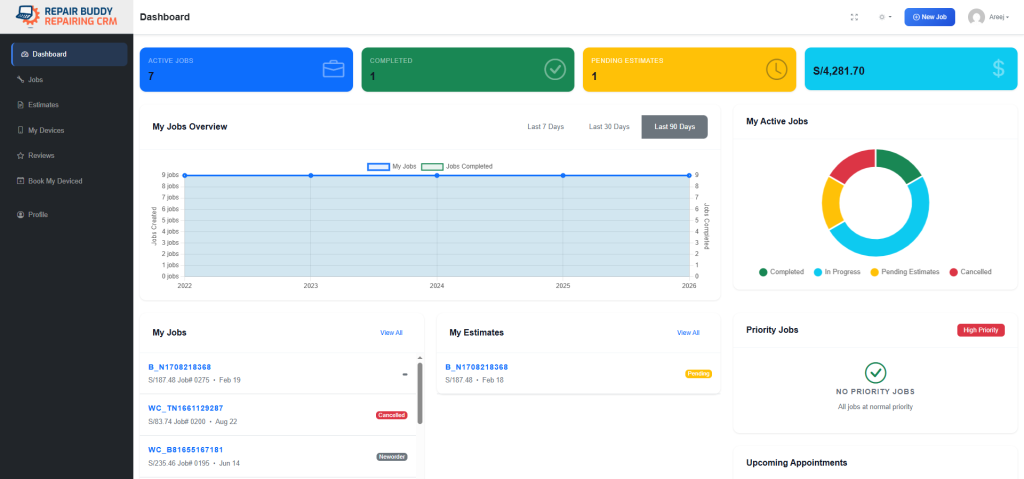
- Track every repair from one dashboard
- Keep customers informed with automated status updates
- Improve repair turnaround times
- Create a more professional customer experience
What Is Cell Phone Repair Intake Software?
Cell phone repair intake software is a specialized repair shop management system that helps repair businesses collect customer information, record device details, create repair tickets, generate work orders, and manage the entire repair process from check-in to pickup. Instead of relying on handwritten forms or spreadsheets, every repair is stored digitally, making it easier for technicians, front desk staff, and customers to stay informed throughout the repair.
Modern repair shops handle dozens or even hundreds of devices every week. Without a structured intake process, it’s easy for important information to be overlooked. Missing IMEI numbers, forgotten device passcodes, undocumented cosmetic damage, or unclear repair requests can all lead to delays, customer disputes, and unnecessary administrative work.
Repair intake software eliminates these problems by creating a standardized workflow for every repair. Whether a customer books online, walks into your repair shop, schedules a pickup, or ships a device for mail-in service, the same process can be followed consistently from beginning to end.
What Information Should Be Collected During Repair Intake?
A professional smartphone repair intake process should capture much more than just a customer’s name and phone number. Collecting complete information at the beginning helps technicians diagnose issues faster, improves communication, and protects your repair business from misunderstandings.
- Customer contact information including name, phone number, and email address.
- Device information such as manufacturer, model, color, storage capacity, IMEI or serial number, and carrier details if applicable.
- Repair request describing the reported issue, symptoms, and services requested by the customer.
- Security information including screen lock passcodes or unlock methods when required for testing and diagnostics.
- Accessories received such as chargers, SIM cards, memory cards, cases, or styluses.
- Pre-existing cosmetic damage including cracked screens, dents, scratches, bent frames, or water damage documented with notes and photos.
- Customer authorization through digital signatures confirming repair approval and service terms.
- Estimated repair costs, expected completion times, and any customer-specific instructions.
Why Digital Repair Intake Is Better Than Paper Forms
Paper repair forms can be misplaced, become difficult to read, or require staff to manually enter the same information into multiple systems. Digital repair intake software removes these bottlenecks by storing every repair in a centralized database where technicians, customer service staff, and business owners can access the latest information instantly.
As soon as a repair ticket is created, the information can flow through the rest of your repair workflow. Estimates can be generated, technicians assigned, replacement parts allocated, invoices prepared, customer notifications sent, and repair status updated—all without re-entering the same information multiple times.
Repair Intake Is the Foundation of Your Entire Workflow
Every successful repair begins with accurate information. A well-designed repair intake system ensures that every department within your repair shop works from the same data. Front desk staff can receive devices quickly, technicians know exactly what work needs to be completed, inventory can be reserved for upcoming repairs, and customers receive consistent updates throughout the repair process.
When your repair intake process is automated, your business spends less time managing paperwork and more time repairing devices, serving customers, and growing revenue.
Step 1: Accept the Repair Request Without the Paperwork
The repair intake process begins the moment a customer contacts your repair shop. Some customers prefer to book online before visiting, while others walk into your store with a damaged device. Many repair businesses also offer mail-in repairs, local pickup services, or on-site repairs for business clients.
Regardless of how a repair request is received, the goal should always be the same: collect complete information once and automatically create a repair record that follows the device throughout its entire lifecycle. This is where cell phone repair intake software eliminates repetitive manual work and ensures every repair starts with accurate information.
Instead of writing details on paper forms or entering the same information into multiple systems, RepairBuddy provides a streamlined digital intake process that automatically creates repair tickets, customer records, and work orders in just a few minutes.
Accept Repairs Through Multiple Booking Channels
Every repair shop serves customers differently. Some rely on walk-in traffic, while others generate most of their business through online bookings. Modern repair businesses often support multiple booking methods to give customers greater flexibility.
RepairBuddy allows repair shops to manage all repair requests from a single dashboard, regardless of how they arrive.
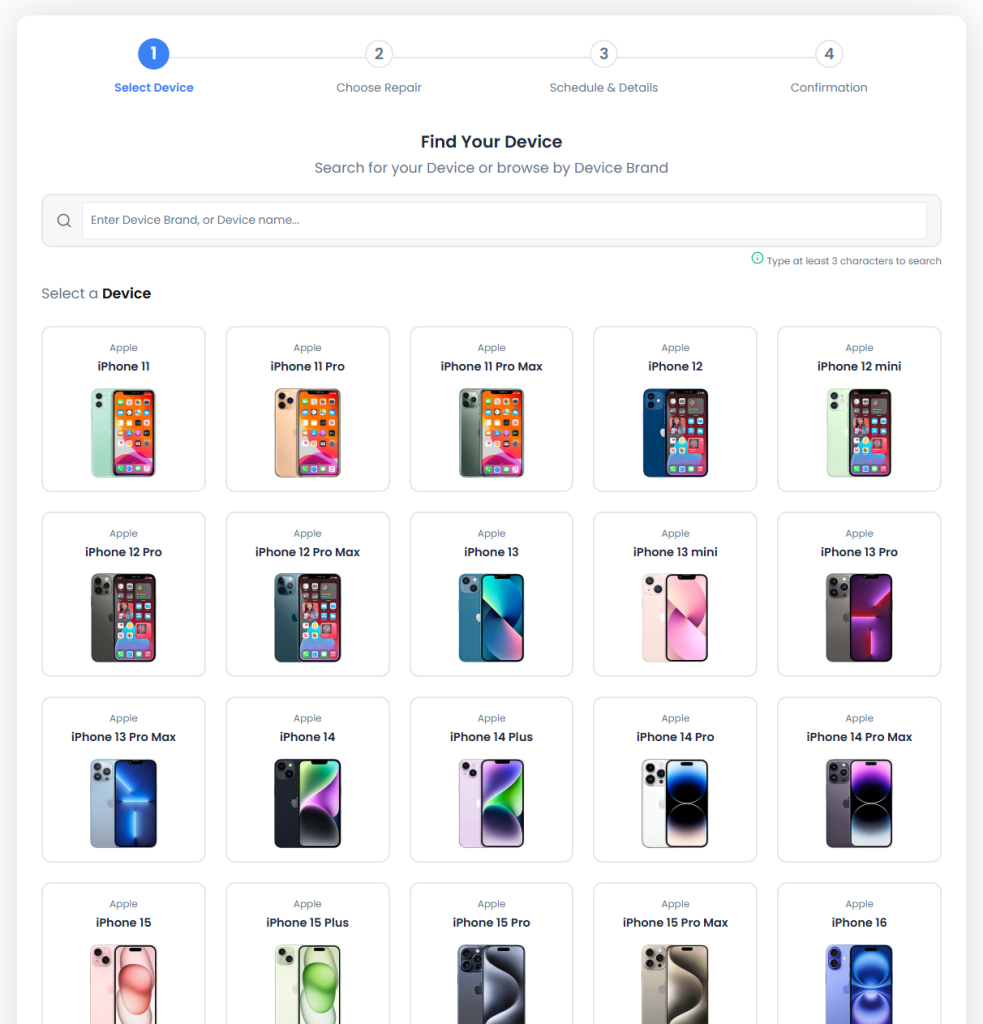
- Online Repair Booking – Customers can book repairs 24/7 through your website by selecting their device, choosing a repair service, and scheduling a convenient appointment.
- Walk-In Repairs – Front desk staff can quickly register customers and create repair tickets while they wait.
- Mail-In Repairs – Accept devices from customers outside your local area and keep them informed throughout the repair process.
- Pickup Repair Requests – Schedule device collection from the customer’s home or business for added convenience.
- On-Site Repairs – Perfect for business clients or technicians providing repairs at customer locations.
Give Customers a Simple Online Booking Experience
Today’s customers expect to book services online, just as they would schedule a doctor’s appointment or reserve a hotel room. An online repair booking form makes your repair shop available even when your business is closed, allowing customers to submit repair requests any time of the day.
With RepairBuddy, customers can choose their device manufacturer, select the exact model, browse available repair services, describe the problem, choose an appointment time, and submit all required details before arriving at your shop. This saves valuable time at the front desk and helps technicians prepare before the device is dropped off.
Pro Tip
Brand-specific booking pages can significantly improve both customer experience and SEO. Instead of sending every visitor to a generic booking form, create dedicated landing pages for popular manufacturers such as Apple, Samsung, Google Pixel, Xiaomi, OPPO, Motorola, OnePlus, Nokia, Huawei, and Honor. Customers immediately see the devices and repair services relevant to them, while search engines can index highly targeted pages for each brand.
Automatically Create Customer Records
One of the biggest advantages of repair intake software is that customer information only needs to be entered once. When a repair request is submitted, RepairBuddy automatically creates or updates the customer profile, stores contact information, links previous repair history, and associates every future repair with the same customer account.
This complete repair history allows your team to quickly identify repeat customers, review previous repairs, check warranty information, and deliver faster customer service without searching through paperwork or disconnected systems.
Every Repair Starts With an Organized Workflow
By automating repair intake from the very beginning, your shop eliminates unnecessary administrative work while creating a professional experience for both customers and technicians. Every booking becomes the starting point for estimates, work orders, inventory allocation, repair tracking, invoicing, and customer communication—ensuring nothing is missed as the repair moves through your workshop.
Step 2: Capture Complete Device Information Before the Repair Begins
Once a customer has booked their repair or arrived at your shop, the next step is to collect detailed information about both the customer and the device. This stage is often rushed in busy repair shops, but it is one of the most important parts of the entire repair workflow.
Using cell phone repair intake software, your staff can collect all the information needed before the device reaches the technician. This reduces delays, prevents misunderstandings, and ensures every repair starts with accurate documentation.
Instead of relying on handwritten notes or memory, RepairBuddy stores every detail within the repair ticket, making it instantly accessible to technicians, customer service staff, and business owners.
Record Complete Device Details
Every smartphone repair begins with identifying the exact device being serviced. Recording accurate device information helps technicians order the correct replacement parts, estimate repair times more accurately, and maintain a complete service history for future repairs.
During the intake process, RepairBuddy allows you to capture important device information including:
- Device manufacturer (Apple, Samsung, Google Pixel, Xiaomi, OnePlus, Motorola, Nokia, Huawei, OPPO, Honor and more)
- Device model
- IMEI or Serial Number
- Storage capacity
- Device color
- Carrier or network information (if applicable)
- Warranty details
Having this information available throughout the repair eliminates guesswork and helps ensure the correct parts and repair procedures are used.
Document the Customer’s Reported Problem
Customers often describe issues differently than technicians. One customer may report that their phone “won’t charge,” while the actual fault could be a damaged charging port, faulty battery, liquid damage, or a motherboard issue.
RepairBuddy allows your team to record detailed repair symptoms, customer concerns, and requested services directly within the repair intake form. These notes become part of the technician’s work order, ensuring everyone understands what needs to be diagnosed and repaired.
Capture Passcodes and Security Information Securely
Many smartphone repairs require technicians to unlock the device for diagnostics, testing, or quality assurance after the repair has been completed. Rather than writing passcodes on paper, RepairBuddy securely stores device access information as part of the repair record, ensuring authorized staff have access when required.
This improves both efficiency and professionalism while reducing the risk of lost or misplaced information.
Protect Your Repair Shop from Damage Disputes
One of the most valuable features of a professional repair intake process is documenting the device’s condition before any work begins. Customers may forget existing scratches, dents, cracked glass, or cosmetic damage after the repair is complete, potentially leading to disputes.
RepairBuddy allows your staff to record pre-existing damage, attach photos of the device during intake, and document the overall condition before technicians begin working. This creates a permanent record that protects both your repair shop and your customers.
Record Accessories Received
Many customers leave more than just their smartphone at the repair counter. Chargers, SIM cards, memory cards, protective cases, Apple Pencils, styluses, or other accessories are often included with the repair.
RepairBuddy enables staff to document every accessory received so nothing is misplaced during the repair process. These details are included on the repair ticket and can be verified when the customer returns to collect their device.
Attach Photos and Supporting Documents
Photos can be extremely valuable during both diagnostics and customer communication. Instead of relying only on written descriptions, RepairBuddy allows intake staff to attach images showing cracked displays, damaged charging ports, water damage indicators, bent frames, or other visible issues.
Supporting files such as previous invoices, warranty documents, or diagnostic reports can also be attached to the repair record, giving technicians all the information they need in one place.
Collect Digital Customer Authorization
Before any repair begins, customers should confirm that they understand your repair terms, pricing policies, and data responsibility. RepairBuddy supports digital signatures during the intake process, allowing customers to authorize repairs electronically without printing paper forms.
Digital authorization creates a professional customer experience while maintaining a clear record of approvals for future reference.
A Strong Intake Process Leads to Better Repairs
Every piece of information collected during intake becomes part of the repair workflow. Accurate device details help technicians diagnose problems faster, documented damage reduces disputes, attached photos provide valuable evidence, and digital signatures create clear customer authorization.
By capturing complete information at the beginning of every repair, your shop spends less time searching for missing details and more time delivering fast, professional smartphone repair services.
Step 3: Automatically Generate Repair Tickets and Technician Work Orders
After the customer and device information has been collected, the next step is turning that information into an organized repair workflow. This is where modern cell phone repair intake software saves your team the most time.
Instead of manually creating paperwork, assigning technicians, and updating multiple spreadsheets, RepairBuddy automatically converts the completed repair intake into a professional repair ticket and technician work order. Every member of your team immediately has access to the same information, reducing communication errors and keeping repairs moving efficiently.
From this point forward, the repair can be tracked from a single dashboard, giving your front desk staff, technicians, and customers complete visibility into the repair process.
Create Professional Repair Tickets Instantly
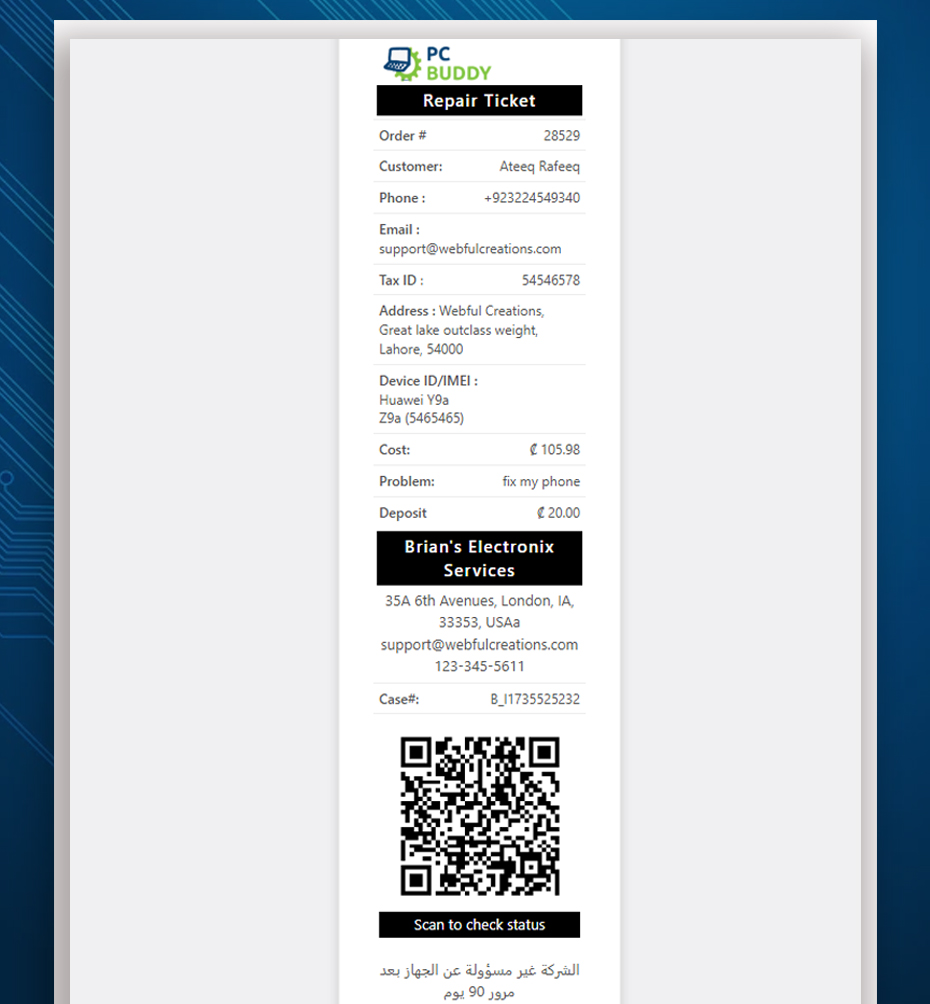
Every repair should have a unique repair ticket that contains all customer information, device details, reported issues, accessories received, repair notes, photos, and customer authorization. Instead of relying on handwritten forms that can easily be misplaced, RepairBuddy generates digital repair tickets automatically during the intake process.
Each repair ticket becomes the central record for the entire repair. As technicians update the repair status, add notes, record completed work, or install replacement parts, the information is saved directly to the same repair record. This creates a complete history that can be referenced long after the repair has been completed.
Generate Detailed Technician Work Orders
Technicians need more than a customer’s description of the problem. They need clear instructions, complete device information, and any supporting documentation that helps them diagnose and complete the repair efficiently.
RepairBuddy automatically generates technician work orders containing everything needed before work begins, including:
- Customer information
- Device make and model
- IMEI or Serial Number
- Reported fault and repair request
- Repair notes
- Pre-repair inspection results
- Photos attached during intake
- Accessories received
- Estimated completion date
- Special technician instructions
Technicians spend less time asking questions and more time repairing devices because every detail is available from the moment the job is assigned.
RepairBuddy Tip
Technician work orders can be viewed digitally or printed whenever required. Shops that prefer paper workflows can still provide technicians with clear work instructions, while businesses moving toward a paperless operation can manage everything directly from the RepairBuddy dashboard.
Assign Repairs to the Right Technician
Not every technician specializes in the same type of repair. Some may focus on screen replacements, while others handle advanced motherboard repairs, data recovery, or liquid damage diagnostics.
RepairBuddy makes technician assignment simple by allowing repair managers to allocate jobs based on technician availability, experience, or workload. This creates a more balanced workflow while helping repairs move through the workshop more efficiently.
Because every repair is assigned within the system, business owners can easily monitor technician workloads, identify bottlenecks, and ensure no repair is forgotten or delayed.
Track Technician Time and Job Progress
Understanding how long repairs actually take helps improve scheduling, estimate labor costs, and measure technician productivity. RepairBuddy allows technicians to record time spent on individual repairs, giving repair shop owners valuable insights into workshop performance.
As work progresses, technicians can update repair statuses, add internal notes, record completed tasks, and communicate important information back to front desk staff without relying on verbal updates or handwritten notes.
Manage Parts Allocation During the Repair
Many smartphone repairs require replacement components such as displays, batteries, charging ports, cameras, speakers, or back glass assemblies. RepairBuddy allows parts to be allocated directly to the repair ticket, making it easier to track inventory usage and understand the true cost of each repair.
Linking parts to individual repair jobs improves inventory accuracy while helping prevent stock shortages caused by unrecorded part usage.
Keep Customers Informed Automatically
One of the biggest causes of incoming phone calls is customers asking, “Is my phone ready yet?” Instead of requiring staff to answer the same questions repeatedly, RepairBuddy allows customers to track the progress of their repair online using their repair ticket or case number.
As technicians update the repair status, customers can receive automatic notifications through email or SMS, keeping them informed without creating additional work for your staff. This improves transparency, builds trust, and significantly reduces the number of status enquiry calls your repair shop receives each day.
One Repair Ticket. Complete Repair History.
Every action performed during the repair—from technician assignments and time logs to parts used, customer messages, estimates, invoices, payments, and final delivery—is linked to the same repair record. Instead of searching through multiple systems, your team has a complete history available in one place whenever it’s needed.
This centralized workflow not only improves daily operations but also provides valuable historical records for warranty repairs, repeat customers, quality control, and future diagnostics.
Watch the Complete Cell Phone Repair Workflow in Action
Reading about an automated repair workflow is one thing—but seeing it in action makes it much easier to understand how each stage connects together.
In the video below, you’ll see how RepairBuddy helps repair shops automate the complete repair lifecycle, from the moment a customer books a repair until the device is returned. The demonstration walks through online booking, repair intake, estimate approvals, technician work orders, inventory allocation, repair status tracking, invoicing, payments, digital signatures, and customer communication.
Whether you’re running a small independent repair business or a high-volume smartphone repair shop, this walkthrough demonstrates how modern cell phone repair intake software can eliminate paperwork, reduce manual administration, and provide a more professional experience for both your staff and your customers.
What You’ll Learn in This Video
- How customers book repairs online using a branded repair booking form.
- Capturing IMEI numbers, passcodes, accessories, and photo attachments during repair intake.
- Automatically creating repair tickets and technician work orders.
- Generating professional repair estimates with one-click customer approval.
- Assigning technicians, tracking repair progress, and logging technician time.
- Managing replacement parts and repair inventory.
- Collecting deposits, partial payments, and final invoices.
- Providing customers with online repair status tracking using QR codes and repair ticket numbers.
- Capturing digital signatures during both repair intake and final device pickup.
- Automating review requests and maintenance reminders after repairs are completed.
Explore the Live Demo Yourself
The video gives you a complete overview of the RepairBuddy workflow, but you can also experience the software yourself using our interactive demo.
👉 Try the Live Cell Phone Repair Shop Software Demo
You can book a repair, browse supported devices, explore repair services, check repair statuses, access the customer portal, and experience the same workflow your own customers would use.
Step 4: Send Professional Repair Estimates and Receive Customer Approval Online
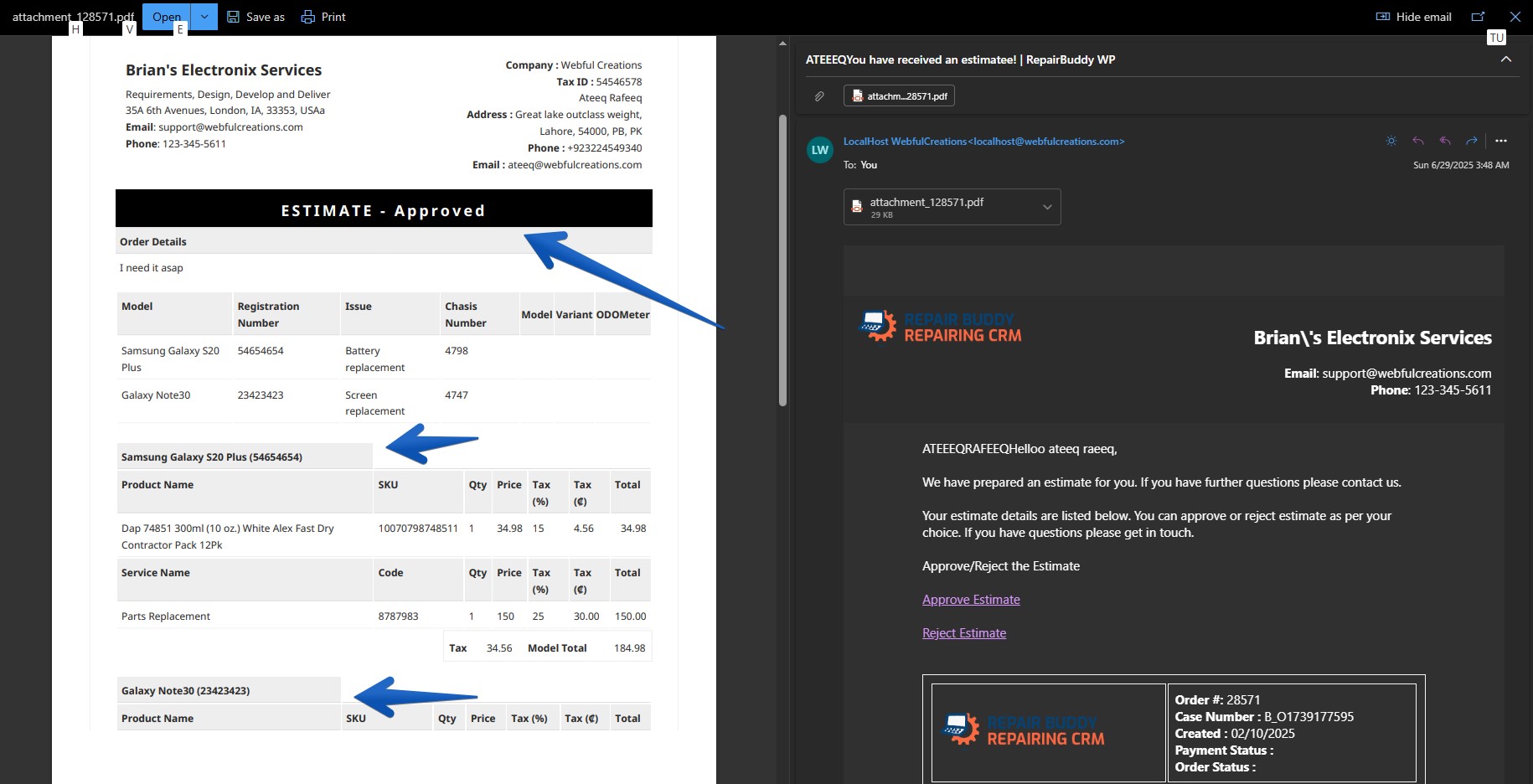
After your technician has inspected the device and identified the required repairs, the next step is providing the customer with a clear and professional repair estimate. This stage is often where repair delays occur, especially when staff spend valuable time calling customers, waiting for responses, or trying to explain pricing over the phone.
Modern cell phone repair intake software simplifies this process by allowing repair shops to generate digital repair estimates that customers can review and approve online. Instead of relying on verbal conversations or handwritten quotations, every estimate becomes part of the repair record, creating a transparent approval process for both the customer and your business.
RepairBuddy streamlines estimate management by allowing repair shops to prepare professional quotations in just a few clicks. As soon as an estimate is ready, it can be sent directly to the customer through email, giving them everything they need to make an informed decision.
Create Accurate Repair Estimates
Professional repair estimates should clearly explain the work being performed while giving customers confidence in your pricing. RepairBuddy allows you to build detailed estimates by combining labor charges, replacement parts, additional services, taxes, discounts, and optional recommendations into one easy-to-read document.
Depending on the repair, an estimate may include:
- Replacement parts such as displays, batteries, charging ports, cameras, or speakers.
- Labour charges based on repair complexity.
- Diagnostic fees where applicable.
- Additional repair recommendations discovered during inspection.
- Estimated repair completion time.
- Warranty information for replacement parts and services.
Providing complete and transparent pricing helps reduce customer uncertainty while improving trust in your repair business.
One-Click Online Estimate Approval
Instead of asking customers to visit the shop again or verbally approve repairs over the phone, RepairBuddy allows customers to review their repair estimate online from any device.
Each estimate includes simple approval options that allow customers to:
- Approve the repair.
- Reject the estimate.
- Review pricing before making a decision.
Once approved, the estimate automatically becomes an active repair job, allowing technicians to begin work immediately without unnecessary administrative delays.
Reduce Repair Delays
Waiting for customer approval is one of the biggest causes of repair delays. Shops that rely entirely on phone calls often spend hours trying to reach customers before technicians can continue working.
With RepairBuddy, repair estimates are delivered digitally, allowing customers to review and approve repairs wherever they are. This significantly reduces waiting time and helps technicians keep repairs moving through the workshop.
Keep Every Approval Connected to the Repair Ticket
Every estimate, customer response, approval, and pricing decision remains linked to the original repair ticket. Business owners and staff can easily review the complete history of each repair without searching through emails, paper files, or handwritten notes.
This creates a complete audit trail while ensuring everyone involved in the repair has access to the latest information.
From Customer Approval to Active Repair
Once the customer approves the estimate, RepairBuddy automatically moves the repair into the next stage of the workflow. Technicians can begin repairs, replacement parts can be allocated, repair statuses can be updated, and customers continue receiving progress notifications throughout the job.
By eliminating manual approval processes, repair shops can complete more repairs each day while delivering a faster, more professional customer experience.
Step 5: Manage Repairs Efficiently with Technician Workflows and Real-Time Status Tracking
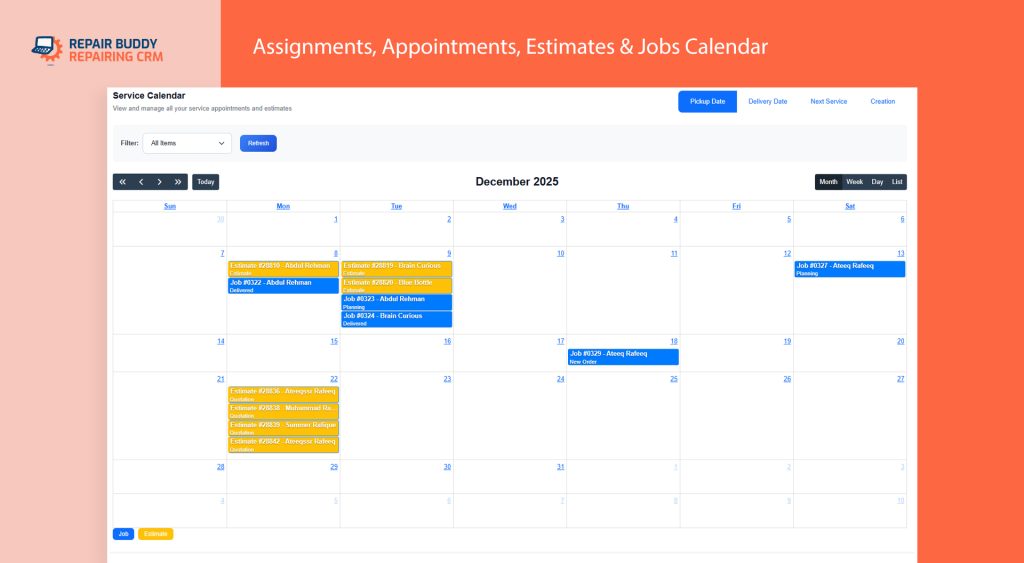
Once a repair estimate has been approved, the repair moves from the front desk to your technicians. This is where an organized workflow becomes essential. Without a proper repair management system, technicians often rely on handwritten notes, verbal instructions, or paper job sheets that can easily be misplaced or misunderstood.
With cell phone repair intake software like RepairBuddy, every repair ticket automatically becomes part of a structured workflow. Technicians receive all the information they need—including customer details, device information, repair notes, attached photos, approved estimates, and replacement parts—allowing them to begin work immediately without searching for missing information.
Assign Repairs to the Right Technician
Every technician has different skills and experience. Some specialize in screen replacements, while others handle advanced motherboard repairs, water damage restoration, Face ID repairs, or data recovery.
RepairBuddy allows repair managers to assign each repair to the most suitable technician while balancing workloads across the workshop. Every assigned technician can immediately view their active repair jobs, priorities, customer notes, and repair history from a centralized dashboard.
This organized workflow helps repair shops complete more repairs each day while reducing confusion between front desk staff and technicians.
Perform Pre-Repair and Post-Repair Evaluations
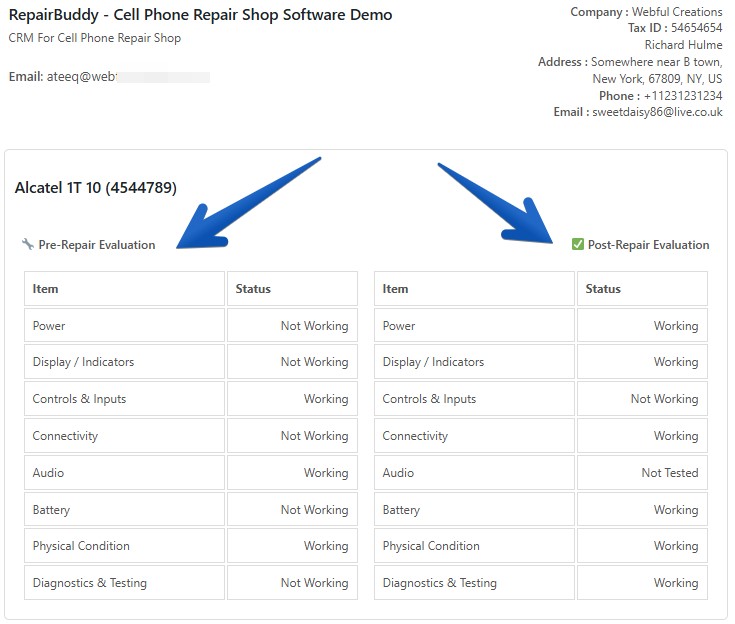
Professional repair shops don’t simply replace broken parts—they document the condition of every device before and after the repair.
RepairBuddy includes customizable pre-repair and post-repair evaluation checklists that help technicians inspect important hardware components before work begins.
These evaluations may include:
- Display functionality
- Touchscreen responsiveness
- Battery health
- Front and rear cameras
- Speakers and microphones
- Charging functionality
- Wi-Fi and Bluetooth connectivity
- Face ID or fingerprint sensors
- Volume buttons
- Power button
- SIM card detection
- Water damage indicators
Recording this information creates a clear history of the device’s condition before repairs begin while helping technicians verify that everything is functioning correctly before returning the device to the customer.
Track Technician Time and Job Progress
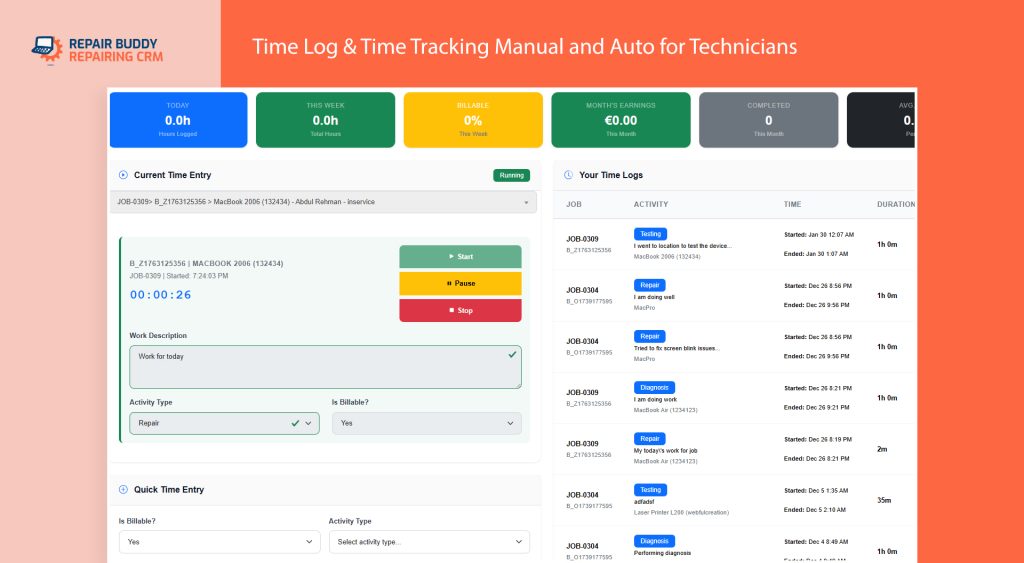
Understanding how long repairs actually take is essential for improving productivity and pricing future repairs accurately.
RepairBuddy allows technicians to record the time spent on each repair, giving shop owners valuable insights into labour costs, technician efficiency, and workshop performance.
As work progresses, technicians can update repair statuses, add internal notes, upload additional photos, and record completed tasks without leaving the repair ticket.
Keep Customers Updated Automatically
One of the biggest frustrations for repair shop owners is answering the same question dozens of times each day:
“Has my phone been repaired yet?”
Instead of relying on staff to answer every phone call, RepairBuddy keeps customers informed automatically.
Whenever the repair status changes, your shop can notify customers through email or SMS, keeping them updated throughout the repair journey.
Customers can also check their repair progress online using their repair ticket number or QR code, allowing them to view the latest repair status without contacting your store.
Centralize Every Repair Conversation
Communication between technicians, front desk staff, and customers often becomes fragmented when information is spread across sticky notes, messaging apps, emails, and phone calls.
RepairBuddy keeps everything connected to the repair ticket. Internal notes remain visible to staff, while customer-facing updates can be shared through the customer portal, creating a complete communication history for every repair.
Monitor Workshop Performance
Because every repair is tracked digitally, repair shop owners gain valuable insights into daily operations.
You can quickly see:
- Active repairs currently in progress
- Repairs waiting for customer approval
- Completed repairs ready for collection
- Average repair turnaround time
- Technician workloads
- Time spent on individual repairs
- Parts used on each repair
- Outstanding customer payments
These operational insights help identify bottlenecks, improve scheduling, and ensure your workshop continues operating efficiently as your repair business grows.
Every Status Update Moves the Repair Forward
Instead of manually chasing paperwork or searching for repair updates, every stage of the workflow is connected. Repair tickets, technician work orders, repair evaluations, inventory allocation, customer notifications, and job progress all work together inside a single platform.
This organized workflow helps repair shops complete repairs faster, improve communication, reduce administrative work, and deliver a better customer experience from the moment a device is received until it is safely returned.
Step 6: Collect Payments, Complete Device Pickup, and Turn First-Time Customers into Repeat Customers
The repair may be complete, but your workflow isn’t finished until the customer has collected their device, payment has been recorded, and the repair has been properly closed. A professional checkout process leaves a lasting impression and helps ensure every repair ends as smoothly as it began.
With cell phone repair intake software, the final stage of the repair is just as organized as the initial intake. RepairBuddy helps repair shops manage invoices, collect payments, obtain digital signatures, and maintain complete repair records without switching between multiple systems.
Accept Deposits, Partial Payments, or Full Payment
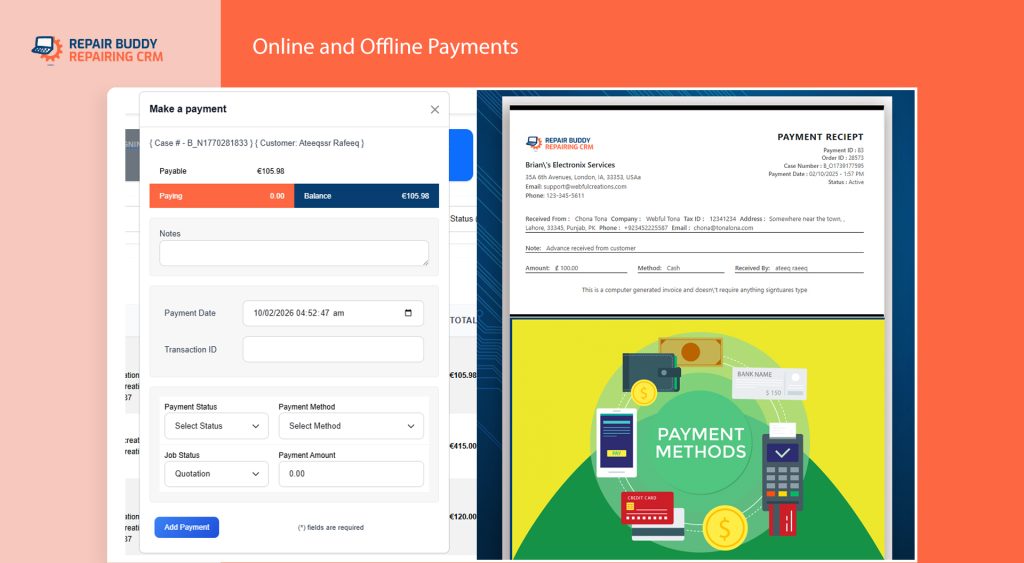
Not every repair follows the same payment process. Some customers pay a deposit before work begins, others pay in full when collecting their device, while larger repairs may require multiple payments.
RepairBuddy gives repair shops the flexibility to record:
- Advance deposits
- Partial payments
- Final balance payments
- Cash payments
- Credit and debit card payments
- Online payment transactions
Every payment is automatically linked to the repair ticket, giving your staff a complete financial history for every job.
Generate Professional Invoices and Receipts
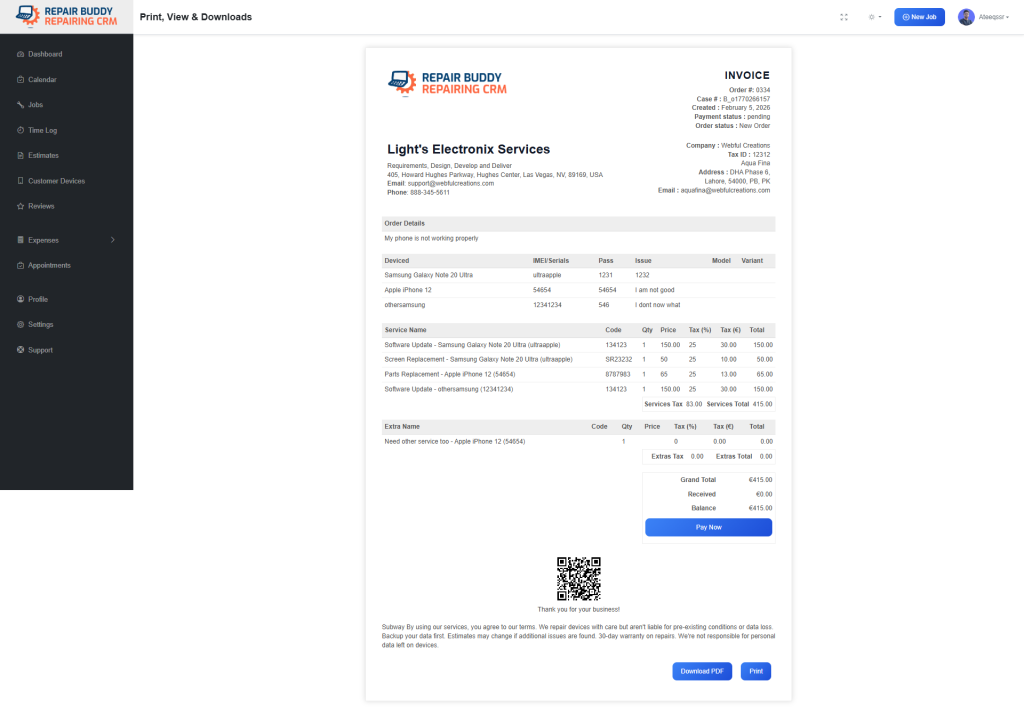
Once the repair has been completed, RepairBuddy generates professional invoices that clearly show the services performed, replacement parts used, labour charges, taxes, discounts, and payment history.
Depending on your workflow, invoices can be viewed digitally, emailed directly to customers, or printed using standard printers or thermal receipt printers for faster checkout at the repair counter.
Providing professional documentation not only improves the customer experience but also simplifies accounting, warranty claims, and future repair history.
Capture Digital Signatures at Pickup
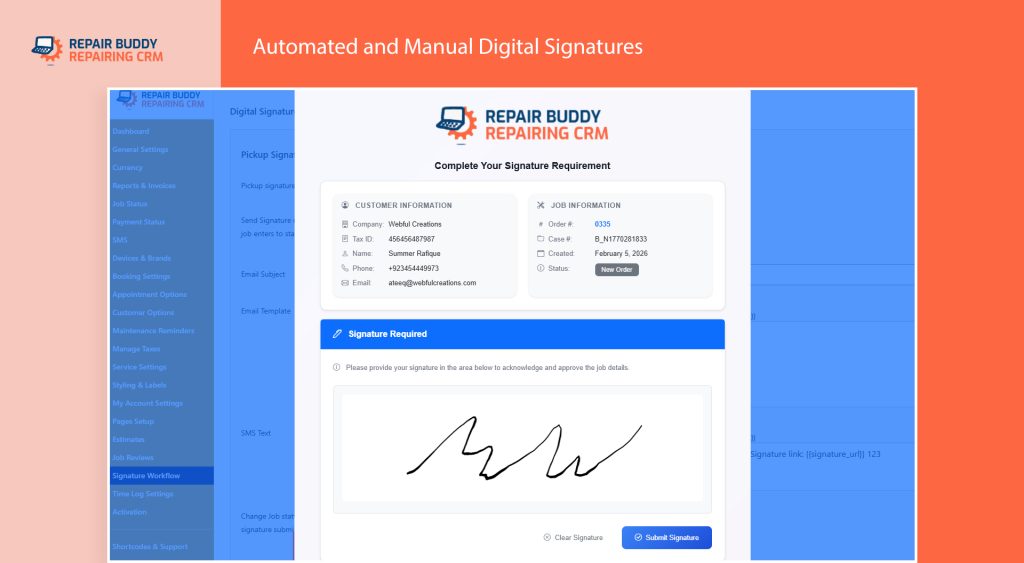
Before returning the repaired device, many repair shops ask customers to confirm that they have received their device in good condition and are satisfied with the completed work.
RepairBuddy supports digital signature collection during both repair intake and final pickup, creating a complete record of customer authorization from beginning to end.
This additional layer of documentation helps reduce future disputes while demonstrating a professional repair process.
Automatically Request Customer Reviews
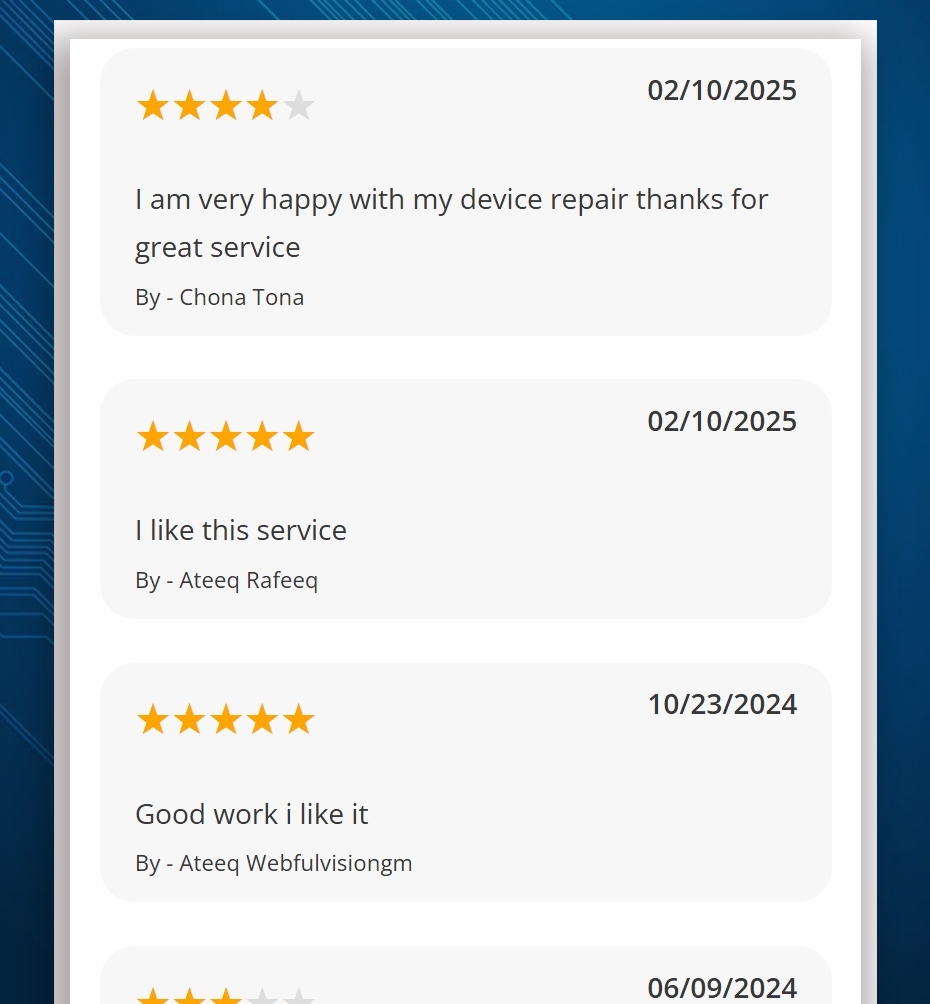
Online reviews have become one of the most important factors influencing whether customers choose a repair shop. Rather than relying on staff to remember to ask for feedback, RepairBuddy can automatically send review requests after a repair has been completed.
By making it easy for satisfied customers to leave reviews, repair shops can strengthen their online reputation, improve local search visibility, and build trust with future customers.
Schedule Maintenance Reminders
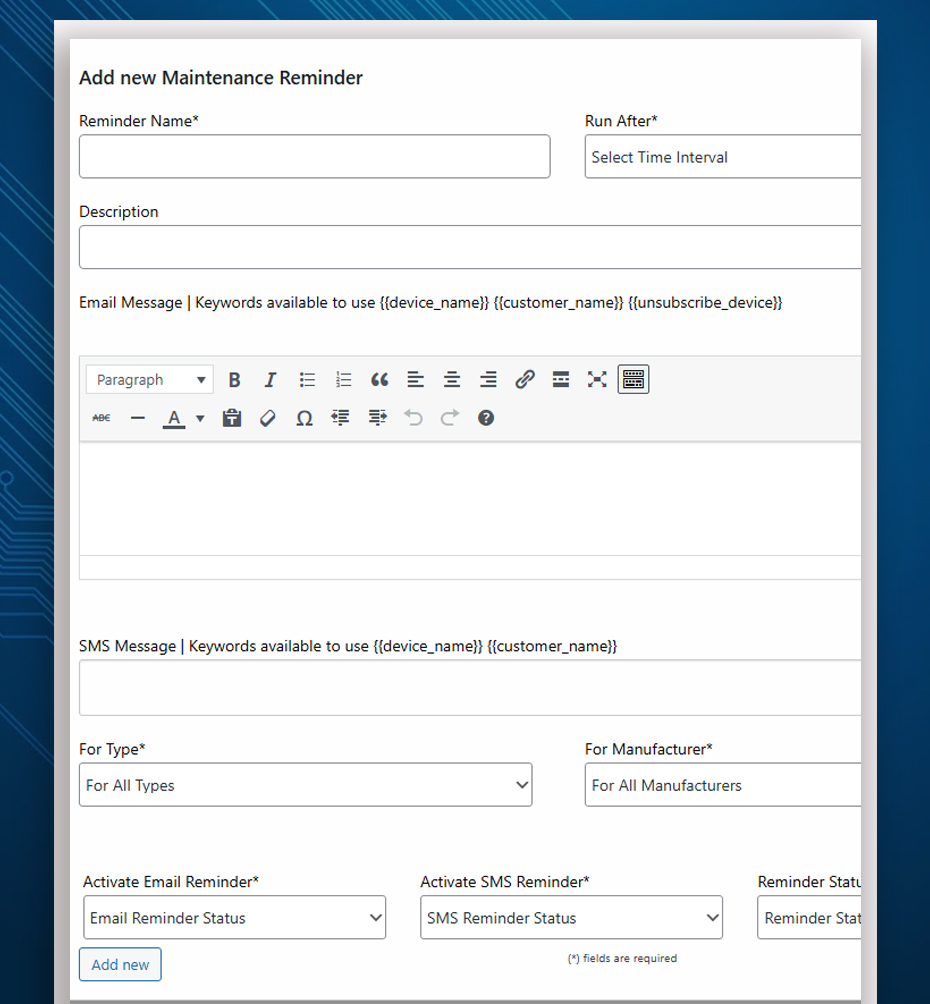
Not every customer returns only when something breaks. Routine maintenance, battery replacements, cleaning services, and accessory upgrades all create opportunities for repeat business.
RepairBuddy allows repair shops to schedule automated maintenance reminders, helping businesses stay connected with customers long after the original repair has been completed.
These reminders encourage customers to return for future services while helping your repair shop build stronger long-term relationships.
Maintain a Complete Repair History
Every completed repair remains securely stored within the customer’s account. When the same customer returns months or even years later, your staff can instantly review previous repairs, invoices, warranty information, replacement parts, technician notes, and communication history.
This complete repair history improves customer service, speeds up future repairs, and helps your team make informed recommendations based on previous work.
From Device Drop-Off to Customer Pickup—One Connected Workflow
A modern repair business depends on more than skilled technicians. It requires a system that keeps every stage of the repair organized—from customer check-in and repair intake to technician work orders, repair estimates, inventory management, invoicing, payments, and customer communication.
By automating the complete repair lifecycle, RepairBuddy helps repair shops reduce manual administration, eliminate paperwork, improve technician productivity, and deliver a faster, more professional customer experience. Instead of managing disconnected processes, your entire repair operation works together through one centralized platform built specifically for the repair industry.
Why RepairBuddy Is More Than Just Cell Phone Repair Intake Software
While capturing customer information is an important first step, successful repair shops need much more than a digital intake form. They need a complete platform that manages every stage of the repair process—from online booking and repair intake to technician work orders, inventory management, invoicing, customer communication, and business reporting.
RepairBuddy was built specifically for repair businesses that want to streamline daily operations, improve customer service, and grow without adding unnecessary administrative work. Whether you operate a small independent repair shop or manage multiple repair locations, RepairBuddy provides the tools needed to organize your entire workflow from one centralized dashboard.
Everything Your Cell Phone Repair Shop Needs in One Platform
Unlike generic CRM systems or basic job management software, RepairBuddy is designed around the way real repair shops operate. Every feature works together to help your team save time, reduce paperwork, and deliver a better customer experience.
- Online repair booking with customizable appointment options.
- Digital repair intake forms with IMEI, passcode, accessory, and photo capture.
- Professional repair tickets and technician work orders.
- Online repair estimates with one-click customer approval.
- Technician assignments, time logs, and repair evaluations.
- Repair status tracking with automatic SMS and email notifications.
- Customer portal for repair history, invoices, estimates, and status updates.
- Inventory and spare parts management.
- Digital signatures during intake and device pickup.
- Professional invoices, thermal receipts, and payment tracking.
- Automated review requests and recurring maintenance reminders.
- Business reports to help monitor workshop performance and profitability.
Built for Every Type of Smartphone Repair Business
RepairBuddy supports repair shops that service virtually every major smartphone manufacturer, including Apple, Samsung, Google Pixel, Xiaomi, OPPO, OnePlus, Motorola, Nokia, Huawei, Honor, Realme, and many others.
Whether your business specializes in screen replacements, battery replacements, charging port repairs, camera repairs, motherboard repairs, water damage restoration, software troubleshooting, or complete device refurbishments, RepairBuddy adapts to your workflow and helps keep every repair organized.
Explore the Complete Cell Phone Repair Shop Software
If you’re looking for a complete solution to automate your repair business, explore our dedicated Cell Phone Repair Shop Software page. You’ll find a detailed overview of RepairBuddy’s features, pricing, screenshots, and everything you need to modernize your repair shop.
Experience the Software Yourself
The best way to understand how RepairBuddy works is to try it yourself. Our interactive demo lets you experience the same customer-facing tools your own repair shop can offer, including online booking, repair tracking, customer accounts, repair services, and more.
Try the Live Interactive Demo
Explore the complete repair workflow, submit a repair booking, browse supported devices, track a repair, and experience how RepairBuddy helps automate every stage of the repair process.
Frequently Asked Questions About Cell Phone Repair Intake Software
What is cell phone repair intake software?
Cell phone repair intake software is a digital system that helps repair shops record customer information, device details, reported issues, IMEI numbers, accessories, photos, and repair authorization when a device is received. It replaces paper intake forms while creating a complete repair ticket that can be tracked throughout the entire repair process.
Why is a digital repair intake process better than paper forms?
Digital repair intake reduces paperwork, prevents lost information, improves technician communication, and creates a permanent repair history for every customer. It also allows repair shops to capture photos, digital signatures, and customer approvals that would be difficult to manage using traditional paper forms.
Can RepairBuddy create technician work orders automatically?
Yes. Once a repair has been booked or accepted, RepairBuddy automatically generates professional technician work orders containing customer details, device information, reported faults, repair notes, attached photos, and other important information technicians need before beginning the repair.
Can customers approve repair estimates online?
Absolutely. RepairBuddy allows repair shops to send digital repair estimates directly to customers. Customers can review pricing and approve or reject repairs online with a single click, helping reduce delays and eliminating the need for repeated phone calls.
Can customers check the repair status online?
Yes. Customers can securely check the status of their repair online using their repair ticket or case number. RepairBuddy also supports automatic email and SMS notifications whenever the repair status changes, reducing the number of incoming status enquiry calls.
Does RepairBuddy support inventory and spare parts management?
Yes. Replacement parts can be linked directly to individual repair jobs, helping repair shops manage inventory levels, monitor part usage, and understand the true cost of every repair.
Can I manage payments and invoices using RepairBuddy?
Yes. RepairBuddy supports deposits, partial payments, balance payments, professional invoices, thermal receipt printing, payment history, and digital records for every completed repair.
Is RepairBuddy suitable for both small and large repair shops?
Yes. Whether you repair a handful of smartphones each week or manage hundreds of repairs every month, RepairBuddy scales with your business. Independent repair shops, growing repair businesses, and multi-location repair companies can all use the platform to automate daily operations.
What types of repair businesses can use RepairBuddy?
Although RepairBuddy is widely used as cell phone repair shop software, it also supports computer repair shops, laptop repair businesses, tablet repair centres, game console repair shops, camera repair businesses, watch repair shops, jewellery repair workshops, drone repair companies, and many other service-based repair businesses.
Where can I see RepairBuddy in action?
You can explore the complete repair workflow by visiting our interactive Cell Phone Repair Shop Software Demo. If you’d like to learn more about the platform, features, and pricing, visit our Cell Phone Repair Shop Software page.
Ready to Automate Your Cell Phone Repair Workflow?
Running a successful repair business requires more than technical expertise. From the moment a customer books a repair until the device is safely returned, every step should be organized, documented, and easy to manage.
Modern cell phone repair intake software helps eliminate paperwork, reduce manual data entry, improve communication between staff and technicians, and deliver a professional customer experience. By automating repair intake, technician work orders, repair estimates, customer approvals, inventory management, invoicing, and repair status tracking, your shop can complete more repairs while spending less time on administration.
RepairBuddy was built specifically for repair businesses that want to streamline operations and grow with confidence. Whether you specialize in iPhone repairs, Samsung Galaxy devices, Google Pixel smartphones, or service multiple smartphone brands, RepairBuddy provides everything you need to manage your workshop from a single platform.
See RepairBuddy in Action
The fastest way to understand how RepairBuddy works is to explore the live demo. Experience the complete customer journey, from online repair booking and digital intake forms to repair tracking, customer portal access, and technician workflows.
Explore the Live Cell Phone Repair Shop Software Demo →
Learn More About RepairBuddy
If you’re comparing repair management systems or looking for a complete solution to modernize your repair business, visit our dedicated Cell Phone Repair Shop Software page. You’ll find detailed feature information, pricing, screenshots, and everything you need to choose the right software for your repair shop.
Take the Next Step Toward a More Efficient Repair Shop
Join repair businesses that are replacing paper forms, spreadsheets, and disconnected tools with a complete repair shop management platform.
✔ Online Repair Booking
✔ Digital Repair Intake Forms
✔ Technician Work Orders
✔ Repair Status Tracking
✔ Inventory Management
✔ Estimates & Invoices
✔ SMS & Email Notifications
✔ Customer Portal
✔ Digital Signatures
✔ Business Reporting