

A car repair estimate is more than a list of prices. It is an opportunity to explain the work your workshop recommends, show customers what they are paying for, and establish clear expectations before repairs begin.
For independent garages and growing automotive workshops, preparing estimates can become time-consuming when information is scattered across handwritten notes, spreadsheets, parts catalogs and customer messages. Missing labor charges, unclear parts pricing or unexpected additional costs can lead to questions, delayed approvals and disagreements about the final bill.
A consistent estimating process helps prevent these problems. By documenting the proposed work, itemizing costs and making customer approval straightforward, your workshop can communicate more professionally and keep repairs moving.
In this guide, you’ll learn how to prepare clear car repair estimates, handle online and walk-in requests, calculate the estimated total, collect customer approval and signatures, and manage rejected estimates. We’ll also explain how RepairBuddy’s estimate management features can support this workflow.
1. Why Clear Car Repair Estimates Matter
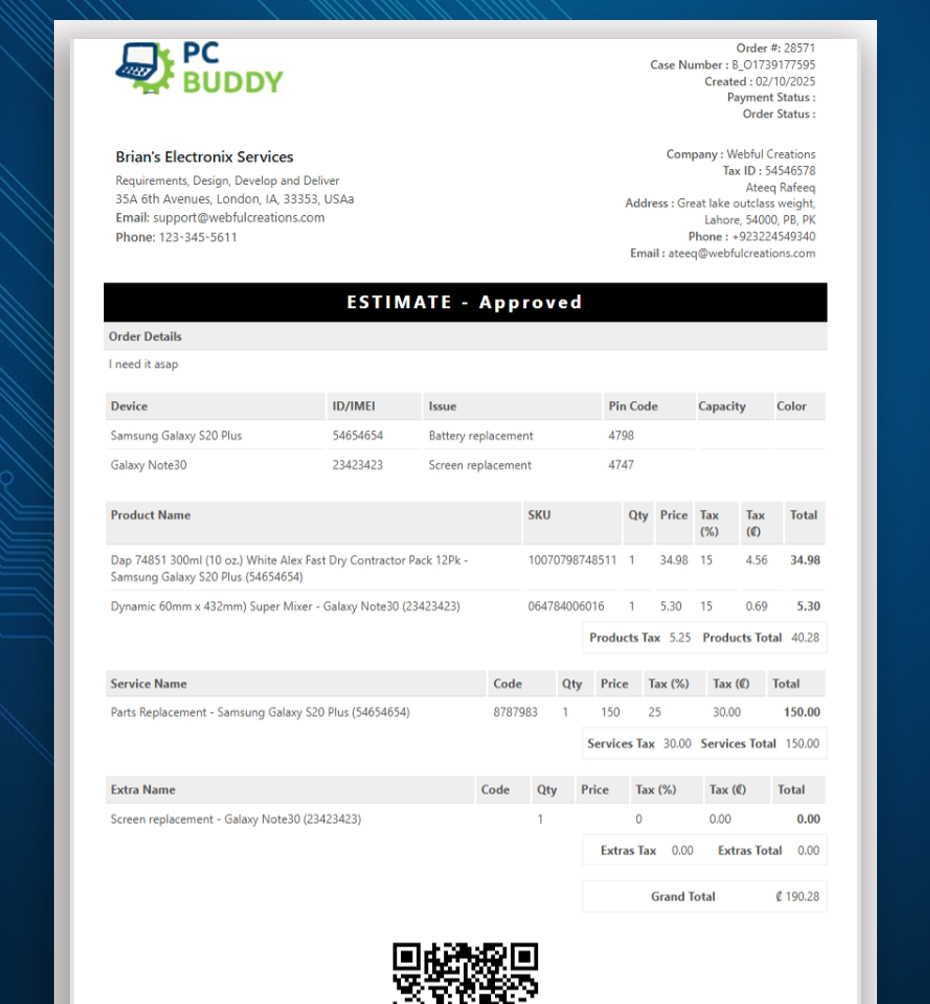
Customers want to understand what needs repairing, why the work is recommended and how much it is likely to cost. If an estimate only contains a single total without explaining the work, customers may struggle to evaluate the proposal.
A clear estimate helps answer several important questions:
- What problem has the workshop identified?
- Which services or repairs are being recommended?
- What parts are required?
- How much will labor and each item cost?
- What taxes and additional charges apply?
- What is the estimated total?
- What should the customer do to approve or reject the proposal?
Clear estimates are valuable for workshops of every size. An independent mechanic may prepare only a few estimates each day, while a growing garage may need to coordinate quotations across several technicians and service advisors. Both benefit from a repeatable process.
Build trust through transparency
Imagine a customer brings a vehicle in because of a braking problem. After inspection, the workshop recommends replacing brake pads and performing additional checks.
Instead of sending a message that simply says the repair will cost $450, the workshop can provide an itemized estimate showing the proposed services, parts, labor and applicable taxes.
The customer can then understand the basis of the price and ask questions about specific items before authorizing the work.
The objective is not to guarantee that every customer will approve every estimate. It is to give customers the information they need to make an informed decision.
2. What Should a Professional Car Repair Estimate Include?
A professional estimate should contain enough detail for the customer to understand the proposed repair without making the document unnecessarily complicated.
The exact information will depend on the repair, the workshop’s processes and local requirements, but the following items are a useful starting point.
Customer and vehicle information
Include the customer’s name and relevant contact information, together with the vehicle details needed to identify the repair request.
These may include:
- Vehicle make and model.
- Registration number or VIN, where applicable.
- Mileage, when relevant to the service.
- The reported problem or reason for the visit.
- The estimate reference and date.
Accurate identification helps staff associate the quotation with the correct customer and vehicle, especially when a workshop handles multiple jobs simultaneously.
Labor and service charges
List the services or repair operations that the workshop proposes to perform.
For example, a brake repair estimate might include inspection, brake pad replacement and associated labor. Each line should use a clear description and show its price.
Avoid vague descriptions such as “general work” when you can explain the service more precisely. Clear descriptions help customers understand what the workshop intends to do.
If labor is included within a service price rather than listed separately, make sure the estimate still communicates the pricing clearly.
Parts and products
List the parts required for the proposed repair, along with their prices and relevant descriptions.
Depending on the job, this may include filters, brake components, belts, fluids or other replacement parts.
When appropriate, identify the part brand or specification so that the customer can understand what is being quoted. Do not promise a particular brand or specification unless it is actually intended for the repair.
Additional items and optional work
Some repairs require additional materials, accessories or services. Others may involve optional recommendations that the customer can consider separately.
Distinguish between work that is required for the proposed repair and optional work that the customer may choose to approve or decline.
This is particularly important when the workshop discovers an additional issue during inspection. Explain the finding and its implications, then obtain the appropriate authorization before carrying out work outside the agreed scope.
Taxes and the estimated total
Show applicable taxes and charges clearly, following your workshop’s tax configuration and local requirements.
A well-organized estimate should allow the customer to understand the item prices, relevant taxes and overall amount being proposed.
For example, a simple illustrative estimate might look like this:
| Description | Amount |
|---|---|
| Brake inspection and labor | $120.00 |
| Brake pads | $180.00 |
| Additional approved service | $50.00 |
| Subtotal | $350.00 |
| Illustrative tax at 10% | $35.00 |
| Estimated total | $385.00 |
This is an example for illustration only, not a RepairBuddy-generated quotation. Actual tax rates, tax treatment and prices depend on the business and applicable rules.
The estimate should also state relevant assumptions, terms and conditions, including whether further inspection could change the proposed scope of work.
Remember that an estimate is not necessarily the final invoice. If the scope or cost changes, communicate the change and obtain additional authorization where required.
3. Create Estimates from Online Car Repair Bookings
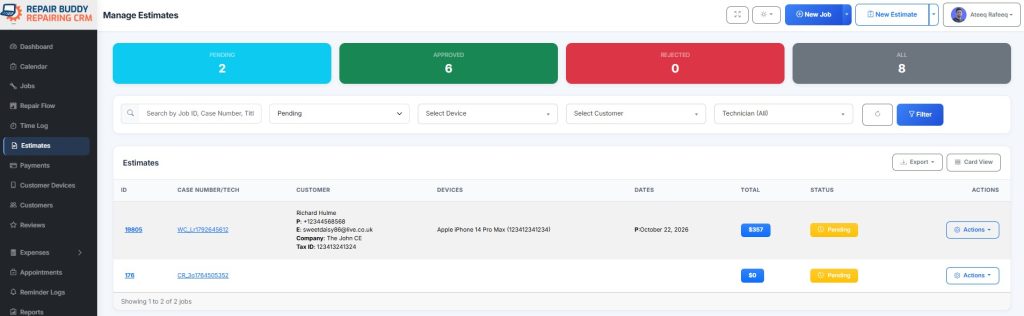
Many customers prefer to request a repair online rather than call a workshop during business hours.
An online booking form can collect information about the vehicle, the reported issue and the requested service before the customer arrives. This gives the workshop a starting point for reviewing the request and preparing an estimate.
A practical workflow looks like this:
- The customer submits an online vehicle booking.
- The workshop reviews the vehicle information and reported problem.
- Staff assess the information available and determine whether further inspection is required.
- The workshop adds the proposed services, parts and other applicable items.
- Staff review the pricing and estimated total.
- The estimate is sent to the customer for approval or rejection.
RepairBuddy supports online repair bookings and allows the shop to prepare an estimate from a booking request. The estimate can include services, parts and other items, with pricing and tax details.
Don’t confuse a booking with a confirmed diagnosis
A booking describes the customer’s request. It does not necessarily establish the complete cause of a mechanical problem.
For example, a customer may report an unusual noise from the front of the vehicle. The workshop may need to inspect the vehicle before it can identify the cause and provide a reliable quotation.
Explain any limitations in the estimate and make clear whether the quoted amount is based on preliminary information or a completed inspection.
This helps set realistic expectations and reduces the risk of customers assuming that an initial quotation covers every possible repair.
Suggested screenshot: Use the real RepairBuddy booking workflow screenshot from your Car Repair Shop Software landing page, followed by the estimate screen showing services and parts being added to a booking.
4. Create Estimates Manually for Walk-In Customers and Other Enquiries
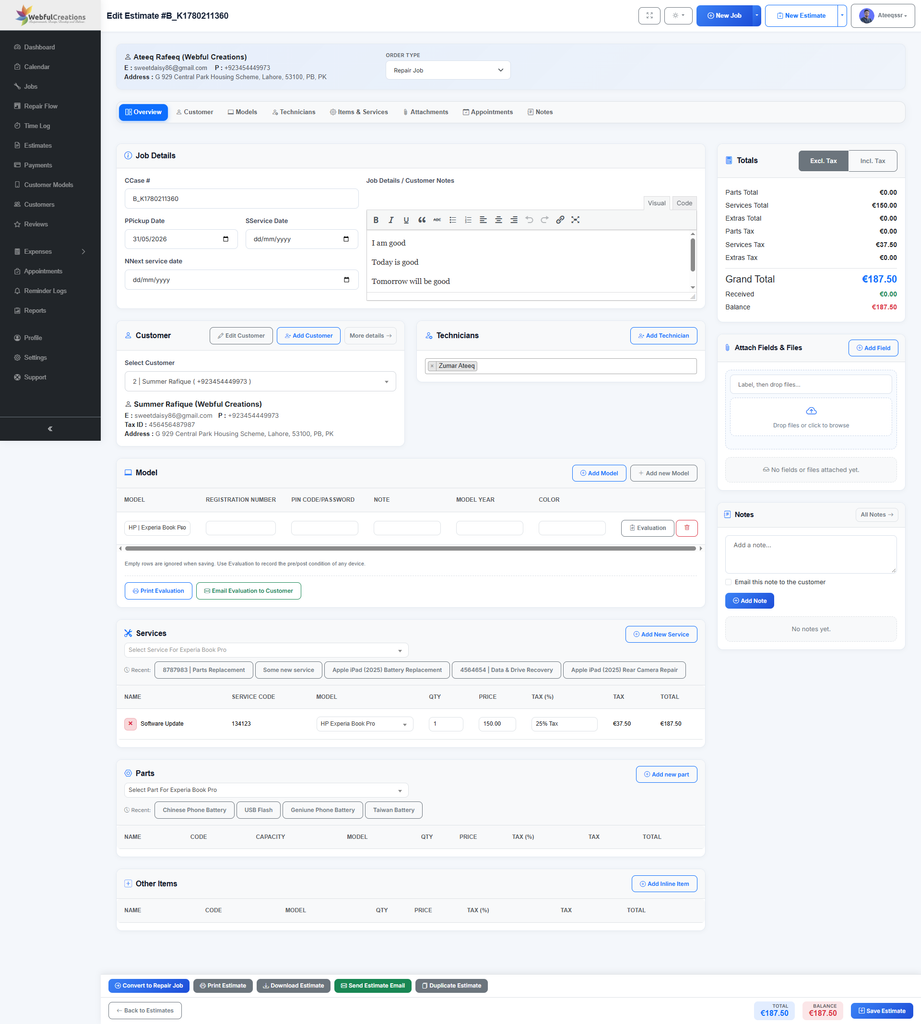
Not every repair starts with an online booking. Customers may visit the workshop in person, contact the business by phone or email, or request a quotation after an initial conversation.
Your estimating process should accommodate these situations without requiring every customer to complete an online booking first.
A manual estimate workflow typically involves:
- Finding or creating the relevant customer record.
- Recording the vehicle and repair information required by the shop.
- Adding the proposed services and labor charges.
- Adding the required parts and other items.
- Reviewing prices, taxes, terms and the estimated total.
- Sending the estimate by email or printing it for the customer.
RepairBuddy supports creating estimates directly from its administration interface, as well as preparing estimates in response to online booking requests. Estimates can be emailed or printed, making the workflow useful for both remote enquiries and walk-in customers.
Keep manual estimates consistent
When estimates are prepared by different staff members, inconsistent descriptions and missing information can make the workshop appear disorganized.
Create a standard process for how services are named, how parts are described, which terms are included and how additional work is documented.
Where possible, use consistent service and parts records instead of repeatedly entering different descriptions for the same item. This can make quotations easier to prepare and compare.
Suggested screenshot: Use the actual RepairBuddy estimate builder or estimates administration screen from your existing product page.
5. Send Estimates That Customers Can Review Easily
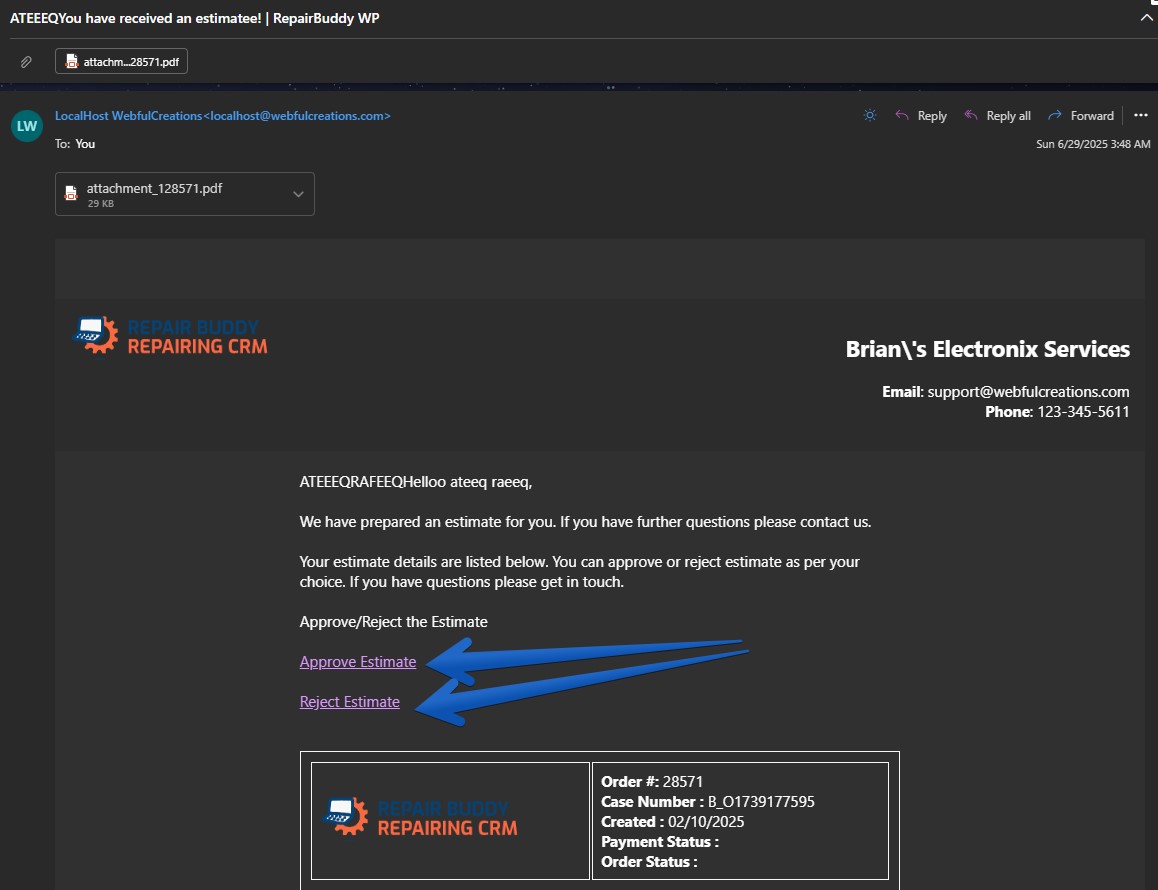
After preparing an estimate, the next step is to present it to the customer in a convenient and understandable format.
A customer should not have to contact the workshop just to understand the basic proposal or find out how to respond.
Before sending an estimate, check that:
- The correct customer and vehicle are associated with it.
- The proposed services and parts are accurate.
- The item prices and estimated total have been reviewed.
- Applicable taxes and charges are represented correctly.
- Important notes and conditions are included.
- The customer knows how to approve or reject the proposal.
RepairBuddy can send estimates to customers by email, including the estimate document, and supports customer approval or rejection through the available email workflow. Estimate information is also available through the customer portal when that feature is configured.
Make the next step clear
A professional estimate should explain what happens after the customer responds.
For example, let the customer know that approval allows the workshop to proceed with the proposed work, subject to the stated terms and any required inspection or authorization steps.
If the customer has questions, provide a way to contact the shop before approving.
Clear communication makes the process easier for both the customer and the staff responsible for managing incoming repairs.
6. Collect Customer Signatures During Estimate Approval
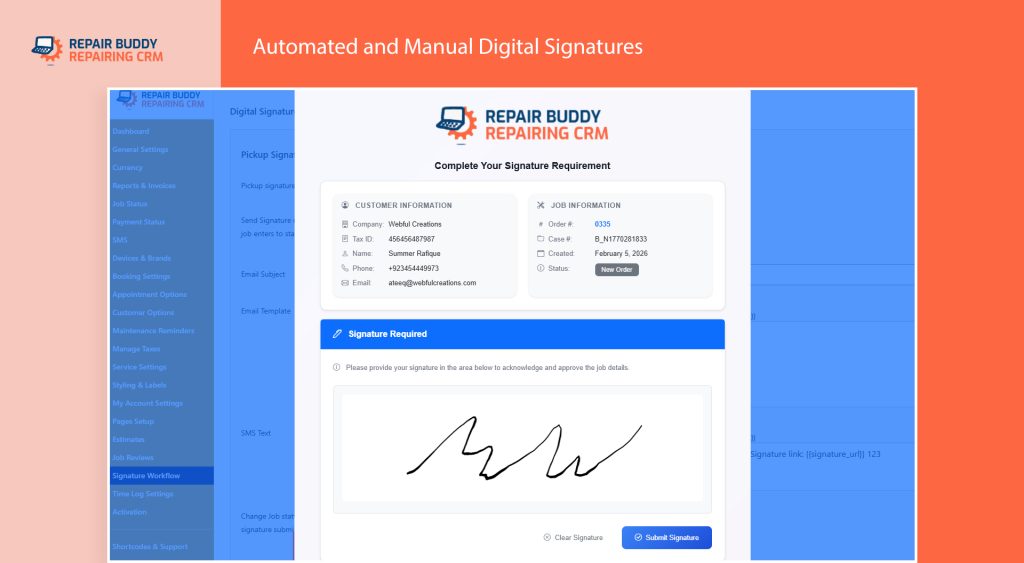
For some repairs, recording the customer’s decision is especially important. The workshop may want a signature alongside the customer’s approval of the proposed work.
RepairBuddy provides an option to collect a customer signature during estimate approval. When this option is enabled, the approval workflow can capture the signature as part of the customer’s response.
This can help the workshop maintain a more complete record of the estimate and the customer’s decision.
Why signatures can be useful
A documented approval process can help a workshop:
- Keep a record associated with the estimate.
- Clarify which proposed work the customer accepted.
- Reduce uncertainty about whether authorization was received.
- Maintain better documentation for internal review and customer communication.
A signature should accompany a clear estimate, not replace it. Customers should be able to understand the proposed work, costs and applicable conditions before signing.
Shops should also make sure that their authorization process and records meet the requirements applicable to their location and business. A digital signature does not automatically guarantee legal enforceability in every circumstance.
Make the approval process part of your normal workflow
Rather than treating signatures as an afterthought, decide when the shop should request one and ensure staff understand how to use the configured option.
For example, a workshop might require a signature for certain types of repair authorization or use the feature as part of its standard estimate approval process.
Suggested screenshot: Use a real RepairBuddy screenshot of the estimate approval process showing the signature option. If that screen is not present on the existing car repair landing page, capture it from your actual installation rather than using a fabricated interface.
7. Understand Why Customers Reject Estimates
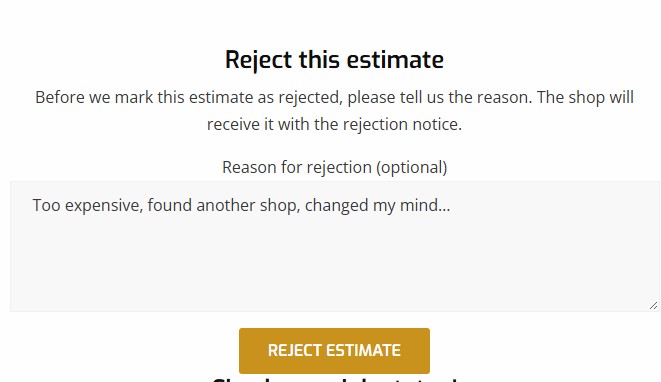
A rejected estimate does not always mean that a customer has lost interest in the workshop.
The customer may consider the cost too high, need more time to decide, want clarification about a recommended repair or have another reason for declining the proposed work.
Without understanding the reason, staff may struggle to decide what follow-up would be helpful.
RepairBuddy can collect the customer’s reason for rejecting an estimate. This gives the workshop additional information about why the proposal was declined.
Use rejection feedback to improve communication
Consider a few possible situations:
The customer is concerned about the price.
The shop can review the quotation, explain the labor or parts costs, and discuss any appropriate alternatives if available.
The customer does not understand a recommended service.
Staff can explain the inspection findings, why the service was recommended and what questions the customer should consider before deciding.
The customer wants to postpone the repair.
The workshop can respond appropriately, document the interaction and follow up when it is suitable to do so.
The customer has chosen another provider.
The shop can review whether its communication, pricing presentation or service process could be improved, without assuming that price was the only reason.
These are examples of possible customer responses, not a fixed list of reasons provided by RepairBuddy.
Review rejection reasons as a business owner
If your workshop regularly receives rejected estimates, look for recurring patterns rather than treating every rejection as an isolated event.
For example, repeated questions about labor charges might indicate that estimates need clearer descriptions. Frequent requests for clarification might suggest that the workshop should improve how it explains recommended repairs.
However, rejection feedback should be interpreted carefully. A customer declining a repair may have reasons unrelated to the quality of your estimate.
Suggested screenshot: Use the real RepairBuddy estimate rejection interface showing the reason field, if available. This feature is worth illustrating because it distinguishes a simple approve-or-reject workflow from one that also gathers feedback.
8. Revise Rejected Estimates and Handle Changes to Repair Costs
When a customer rejects an estimate, the workshop should first understand the reason before deciding whether to revise the proposal.
Sometimes the original estimate remains appropriate and no further action is needed. In other cases, the customer may ask for clarification, or the shop may need to correct an item or revise the proposed scope.
RepairBuddy supports duplicating or cloning rejected estimates so the workshop can modify the relevant details and send a revised quotation.
This helps staff prepare a new proposal without having to recreate the entire estimate from scratch.
Keep revised estimates clear
When preparing a revised estimate:
- Review the customer’s feedback.
- Confirm which services or parts remain necessary.
- Make the relevant pricing or scope changes.
- Update notes or terms where appropriate.
- Review the new estimated total.
- Explain what has changed when sending the revised proposal.
Do not remove a necessary repair simply to make the total lower without explaining the consequences. If alternatives are appropriate, explain the differences so the customer can make an informed decision.
Communicate additional findings before proceeding
Sometimes the initial estimate is prepared before the workshop has completed its inspection. The technician may later identify another issue or find that the original scope needs to change.
In these cases, document the new findings, explain the impact on the proposed repair and seek the required customer authorization before carrying out additional work.
An organized revision process helps avoid confusion about which proposal the customer accepted.
9. Convert Approved Estimates into Repair Jobs
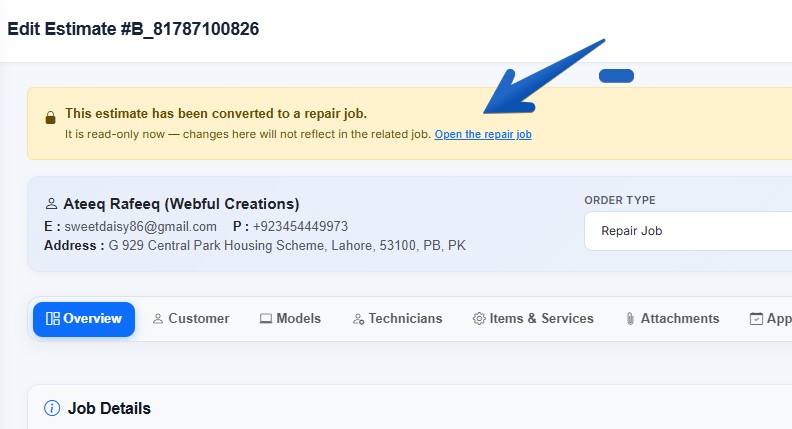
An approved estimate is an important transition point: the customer has accepted the proposed work, and the workshop can move into the next stage of its repair workflow.
RepairBuddy can automatically convert an approved estimate into an active repair job. This connects the estimating process with job management and helps staff continue working from the information already recorded.
After approval, the workshop can use its job management workflow to organize the repair, assign technicians, record relevant work, update job status and manage the work through completion.
The exact steps will depend on the shop’s configuration and operating procedures.
Avoid losing information between estimating and repair
When the estimate and repair job are managed separately, staff may need to re-enter details or refer to multiple records to understand what was authorized.
Connecting the approved estimate to the repair job helps maintain continuity between the proposed work and the active repair.
Staff should still verify that the job reflects the approved scope and that any subsequent changes are documented and authorized appropriately.
Suggested screenshot: Use the actual RepairBuddy workflow image showing an approved estimate moving into the job management process, if available in your existing screenshot collection.
10. Build a Consistent Estimating Process for Your Workshop
The best estimate workflow is one that staff can follow consistently, whether the workshop prepares a handful of quotations or manages a high volume of repair requests.
A simple process can help small garages stay organized while giving growing workshops a repeatable approach across their team.
Use this checklist when preparing an estimate:
- Confirm the correct customer and vehicle.
- Review the reported problem and available inspection findings.
- Describe the proposed services and labor clearly.
- Add the required parts and other applicable items.
- Review prices, taxes and the estimated total.
- Include relevant terms, assumptions and notes.
- Send the estimate using the appropriate communication method.
- Collect the customer’s approval and signature when required.
- If rejected, review the reason and decide whether follow-up is appropriate.
- Revise and resend the estimate when necessary.
- Move approved work into the repair job workflow.
- Document any subsequent changes to the agreed scope.
For independent garages
Focus on keeping the process simple. Use clear descriptions, standard service records and a consistent method for sending estimates and recording customer decisions.
Even a small workshop can benefit from knowing which estimates are waiting for a response and which have been approved.
For growing workshops
Consistency becomes more important when multiple staff members prepare estimates or manage customer enquiries.
Establish responsibilities for reviewing quotations, following up on pending estimates and documenting revised proposals. Regularly review the estimating process to identify recurring questions or delays.
Software can help organize these tasks, but clear internal procedures and accurate information remain essential.
11. How RepairBuddy Helps Manage Car Repair Estimates
RepairBuddy provides estimate management functionality designed to connect customer enquiries, quotations, approval decisions and repair jobs.
For automotive workshops, the relevant capabilities include:
- Estimates from online bookings: Prepare quotations in response to customer booking requests.
- Manual estimates: Create estimates directly from the administration interface.
- Services and labor: Add proposed services and their associated pricing.
- Parts and additional items: Include the items required for the proposed repair.
- Tax and total breakdowns: Present the relevant pricing details and estimated total according to the configured estimate.
- Email communication: Send estimates to customers for review.
- Customer approval or rejection: Let customers respond through the supported approval workflow.
- Digital signatures during estimate approval: Enable the option to collect a customer signature as part of approval.
- Rejection reasons: Collect feedback when customers reject an estimate.
- Estimate revisions: Duplicate rejected estimates, make changes and send a revised quotation.
- Repair job conversion: Convert an approved estimate into an active repair job.
- Estimate records and statuses: Keep track of estimates and their approval outcomes.
These features can help workshops replace fragmented quotation processes with a more organized workflow.
RepairBuddy is available as a WordPress repair shop management plugin, and RepairBuddy Cloud provides a hosted alternative. The best deployment option depends on your business requirements and how you prefer to manage your software.
Explore the RepairBuddy Car Repair Shop Software page to learn more about its automotive workflow.
You can also review the dedicated Repair Estimates and Quotations feature page for more information about the estimate module.
Frequently Asked Questions
What should a car repair estimate include?
A car repair estimate should identify the customer and vehicle, describe the proposed repair, list labor and services, include required parts and additional items, show applicable taxes and charges, and present the estimated total. Relevant terms and assumptions should also be included.
What is the difference between a repair estimate and an invoice?
An estimate describes the proposed work and its expected cost before the work is authorized or completed. An invoice records the amount charged for the work being billed. The final invoice may differ from the original estimate if the scope changes and those changes are properly authorized.
Can a customer approve a car repair estimate online?
Yes. RepairBuddy supports sending estimates to customers for approval or rejection through its email workflow. The available customer portal also supports estimate review and approval when configured.
Can RepairBuddy collect a customer’s signature when approving an estimate?
RepairBuddy includes an option to collect a customer signature during estimate approval. The shop can enable this option as part of its approval workflow.
Can a repair shop find out why a customer rejected an estimate?
RepairBuddy can collect the customer’s reason for rejecting an estimate. The workshop can use this feedback to understand the customer’s concerns and decide whether a clarification or revised quotation would be appropriate.
Can I revise an estimate after a customer rejects it?
RepairBuddy supports duplicating or cloning a rejected estimate so the shop can update the relevant details and send a revised quotation.
Can an approved estimate become a repair job?
Yes. RepairBuddy supports automatically converting an approved estimate into an active repair job, helping connect the quotation process with the repair workflow.
Can estimates be created without an online booking?
Yes. RepairBuddy supports manually creating estimates from the administration interface, so a workshop can prepare quotations for walk-in customers and other enquiries as well as online bookings.
Conclusion: Make Every Repair Estimate Clear, Professional and Actionable
A good car repair estimate helps customers understand the proposed work, evaluate the cost and make an informed decision. It also gives the workshop a clearer starting point for managing the repair.
Start with accurate customer and vehicle information. Itemize services, labor, parts and additional items. Show the applicable taxes and estimated total clearly, and explain any assumptions that could affect the final cost.
Then make the response process straightforward. Record approvals, collect signatures when required, learn from rejection feedback and revise quotations when appropriate. Once the customer approves the proposal, connect it to the repair job and document any subsequent changes.
For independent garages, these practices can make estimates more consistent and easier to manage. For growing workshops, they provide a repeatable process that staff can follow across a larger volume of enquiries.
RepairBuddy brings estimate creation, customer approvals, signature collection, rejection feedback and repair job management into a connected workflow.
Want to see how RepairBuddy can help organize your car repair estimates?
Explore Car Repair Shop Software